See your options side by side
Choose one task and 2–4 tools. Compare pricing, output, test results and trust.
Test scope & comparison notes
These are recorded facts, not a unified ranking. Tested tiers and scope are not consistently recorded. Read pricing with its date and timing with its conditions. Privacy observations reflect visible flows and statements, not a security audit.
Cross-task capability coverage across selected products
Each product is scored independently per task edge; switch tasks below while keeping shared products selected| Task edge | PDFgear | avepdf.com | Switch / compare |
|---|---|---|---|
| PDF to Word | 82/100 DOCX · Output attached | 76/100 DOCX · Output attached | Active task |
| PDF compression | 99/100 PDF · Output attached | 95/100 PDF · Output attached | |
| Scanned PDF OCR | Not tested in topic | 94/100 PDF · Output attached | Compare in task topic → |
| PDF merge & split | 99/100 PDF · Output attached | 94/100 PDF · Output attached |
Select at least 2 tools to compare
You can also filter a task page first, then compare your shortlist.
Browse this task →| Criterion | PDFgear PDF to Word 82/100 Seven-aspect task score Free login-free access includes deletion, but a skippable sharing prompt interrupts conversion and tables retain only visual borders, hindering edits. Tested export DOCX · Output attached Historical test · 2026-10-18 | AvePDF PDF to Word (by Nutrient / Orpalis) PDF to Word 76/100 Seven-aspect task score Clearly states its two-action free quota upfront and lets guests quickly export a two-page DOCX with full text retention, but flattens tables into plain paragraphs and applies different retention terms to free uploads. Tested export DOCX · Output attached Historical test · 2026-10-19 |
|---|---|---|
| Pricing & rules | ||
| Pricing plans | PDFgear web PDF-to-Word; free desktop alternative noted separately · 2026-10-20 Plan · source date Monthly / one-time Annual bill / period Quota & limits Web free2026-10-20 ↗ Free Free Free One PDF at a time, up to 100 MB; OCR is claimed by the vendor. Batch processing and no file-size limit are desktop features. 1 plan / billing-period records, all listed; — means that period is not recorded. The official web limit is 100 MB per file. Its OCR claim is not a RealTest scanned-document test. Desktop batch and offline processing are not web capabilities. Cancellation, sources & verification recordCancellation and refund terms follow official checkout and help policies. Official feature and pricing page ↗ · 2026-10-20 Capture 1 ↗ | AvePDF web Free and Annual Premium plans · 2026-10-21 Plan · source date Monthly / one-time Annual bill / period Quota & limits AvePDF Free2026-10-21 ↗ Free Free Free Maximum 2 processing actions per 6 hours; max file size 128 MB, up to 10 files per processing across 50+ document tools AvePDF Premium2026-10-21 ↗ — USD 55/year Annual Single-user annual payment of USD 55; unlimited document processing with no hourly limit, max file size 512 MB, up to 100 files per action, no ads and technical support Billed annually as a single USD 55 payment; cancel anytime with a 30-day money-back guarantee 2 plan / billing-period records, all listed; — means that period is not recorded. The official pricing page offers a Free tier (2 actions per 6 hours, 128 MB file limit) and an annual AvePDF Premium tier billed once at USD 55/year, with no standalone monthly plan. Cancellation, sources & verification recordCancel anytime; the official pricing page states a 30-day money-back guarantee. AvePDF official pricing page ↗ · 2026-10-21 Capture 1 ↗ |
| Free & trial allowance on the test date | Both the web tool (including Advanced OCR) and cross-platform desktop/mobile apps are currently 100% free | 2 free actions without login (up to 128 MB per file); exports a valid 11,435-byte DOCX with 100% text retention but 0 native tables. |
| Cancellation & refunds | Cancellation and refund terms follow official checkout and help policies. | Cancel anytime; the official pricing page states a 30-day money-back guarantee. |
| Disclosure of costs & limits | Completely free throughout; only requires clicking 'skip' on the social share modal | Not verified |
| Task quality | ||
| Measured fixture results | Text retained: 100% · Editable table cells: 0 · Page 2 preserved: Yes | Text retained: 100% · Editable table cells: 0 · Page 2 preserved: Yes |
| Fixture findings | Text was retained but tables were not editable grids; a sharing prompt appeared during conversion. | Both pages of body text and the footer token were preserved; the 4x4 table was flattened into plain paragraphs. |
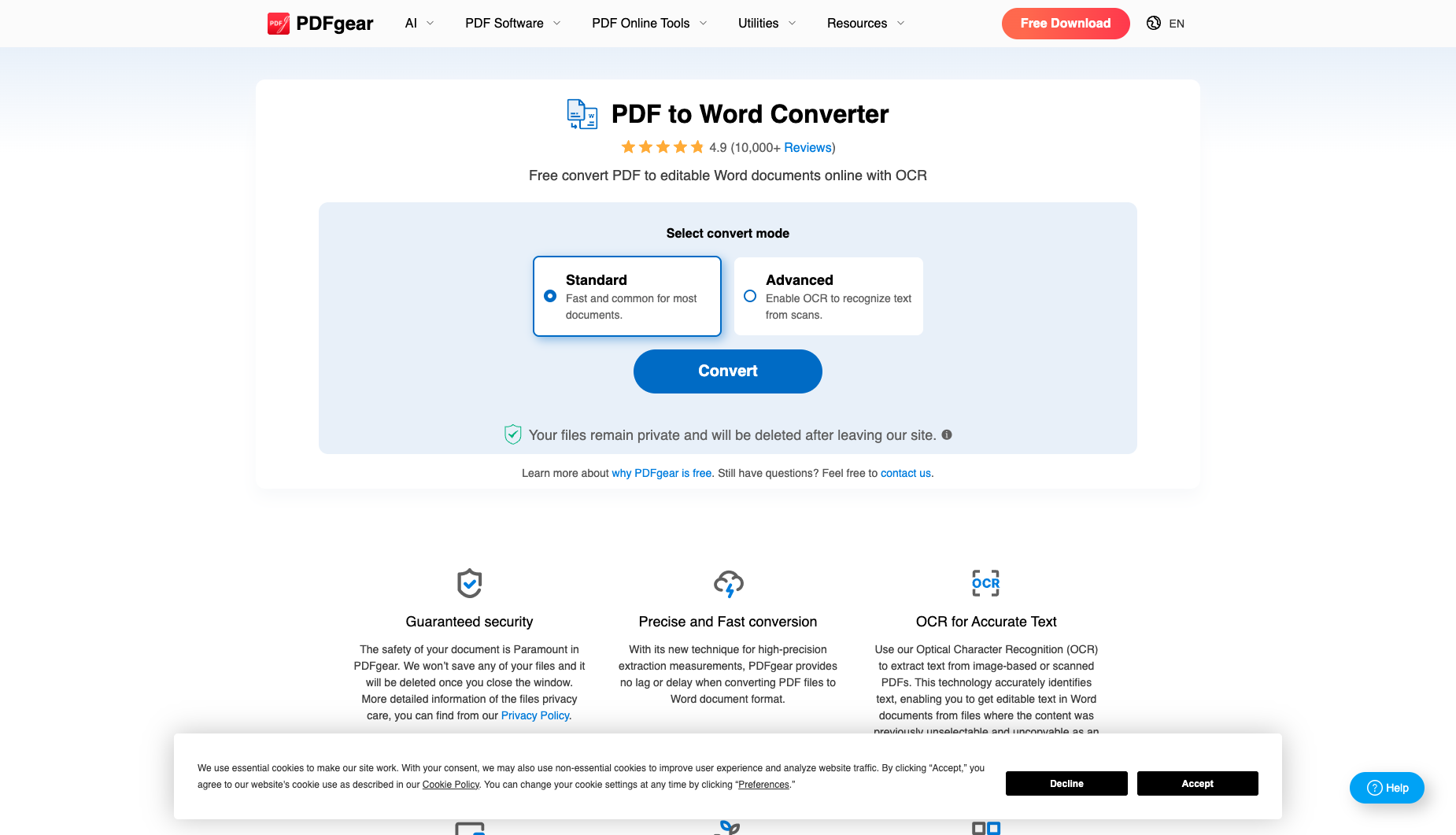
| Original historical observation | PDFgear stays true to its 100% free philosophy—offering both Standard and Advanced OCR modes without login (02_workspace.png) and exporting a 16.0 KB .docx with 100% text retention and instant deletion (03_download.png); its only drawbacks are a 'Share to Continue' prompt with a faint gray 'skip' button (03_share_modal.png) and paragraph-based rather than native <w:tbl> table reconstruction. | Exported a valid 11,435-byte DOCX preserving all text checkpoints and Page 2, but flattening the 4×4 table into plain paragraphs. |
| Suitable uses · historical assessment | Users who detest paywalls and third-party ads or need free OCR text recognition on scanned PDFs | Not verified |
| Result & output evidence | ||
| Scans / OCR | The fixture is a text PDF; scans and OCR were not tested | The fixture is a text PDF; scans and OCR were not tested |
| Delivery capabilities | ||
| Recorded export specifications | DOCX · Output attached · No watermark in test | DOCX · Output attached · Check watermark record |
| Historical specification note · not an official maximum | Full 2-page unwatermarked .docx (16.0 KB, 39 paragraphs, free OCR mode supported) | Not verified |
| Watermark observation | No watermark | Not verified |
| Batch & API | Single-file conversion on web; unlimited local batch conversion via free Windows/macOS desktop app | Not verified |
| Recorded free-tier dimensions | Not verified | Not verified |
| Attached file dimensions | Not verified | Not verified |
| Published allowances & file limits · not tested | Web free: One PDF at a time, up to 100 MB; OCR is claimed by the vendor. Batch processing and no file-size limit are desktop features. | AvePDF Free: Maximum 2 processing actions per 6 hours; max file size 128 MB, up to 10 files per processing across 50+ document tools |
| Speed & reliability | ||
| Timing observation | Network-observed server wait: 10.8s · End-to-end reference: 12.3s | Network-observed server wait: 1.78s · End-to-end reference: 2.54s |
| Date & fixture | 2026-10-18 · anchor_pdf2word_v1 · US-West (California, AS2914) | 2026-10-19 · anchor_pdf2word_v1 · US-West (California, AS2914) |
| Repeated tests & reliability | No standardized repetition count, success rate or variability range is recorded. | No standardized repetition count, success rate or variability range is recorded. |
| Interaction experience | ||
| Account requirements | No login in this test | Not verified |
| Sign-in methods | No login or registration required | No login required within the 2-action free quota |
| Manual adjustment | Not verified | Not verified |
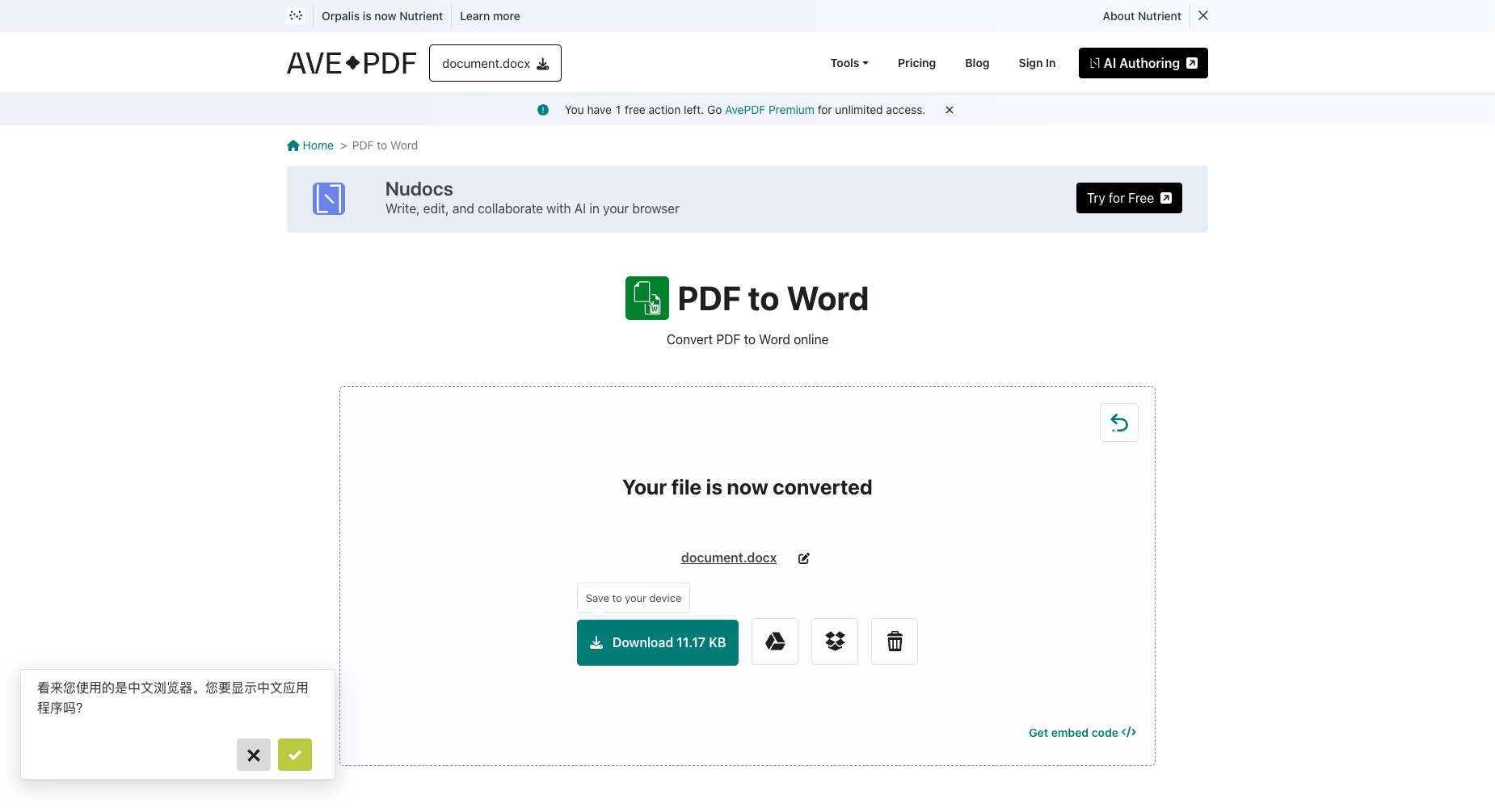
| Interaction observations | Zero third-party banner ads, though clicking 'Convert' pops up a 'Share to Continue — Share this tool on social media to unlock access and continue converting your files' prompt with a faint gray 'skip' link at the bottom (03_share_modal.png). | No forced popup at download; page displays a browser-language prompt, Nutrient acquisition notice, and Nudocs AI banner. |
| Background & reputation | ||
| Service lifecycle notice | Not verified | Not verified |
| Operator | PDFgear Tech Pte. Ltd. (pdfgear.com) | Orpalis / Nutrient (GdPicture SDK) Web Tool |
| Recorded origin | Singapore | Not verified |
| Domain history record | 2022–Present (fast-growing free cross-platform PDF suite) | Not verified |
| Background & reputation assessment | Operated by Singapore-based PDFgear Tech Pte. Ltd., widely praised across tech communities for its 100% free Windows, macOS, iOS, and Android apps. | Operated by Orpalis (now Nutrient / GdPicture.NET SDK) as the official web showcase for its document SDK. |
| External reputation record | Not verified | Not verified |
| Engineering & privacy | ||
| Processing location | Uploaded for cloud processing | Uploaded for cloud processing |
| Third-party tracking record | Not verified | Not verified |
| Engineering & privacy assessment | Provides an instant trash-can delete icon right beside 'Download File' and explicitly states 'Your files remain private and will be deleted after leaving our site' (03_download.png). | On-page Privacy notice states uploaded files are accessible for up to 30 minutes and can be manually deleted, while explicitly distinguishing free users from "We do not retain files for AvePDF Premium subscribers". |
| Retention statement | Explicit retention period unconfirmed; inspect policy record | Claims deletion within 30 minutes; deletion not independently verified |
| Evaluation basis | ||
| Pricing transparency | 33 / 35 Genuinely free with no subscription paywall, no registration requirement, no watermark, and even makes its 'Advanced (Enable OCR to recognize text from scans)' mode completely free for guests (02_workspace.png, 03_download.png). | 28 / 35 Top banner clearly discloses "You have 2 free actions left" and "Max file size: 128 MB" before upload; within that quota, guests convert and download the 11.2 KB DOCX directly without a login wall. |
| Interaction restraint | 19 / 30 Zero third-party banner ads, though clicking 'Convert' pops up a 'Share to Continue — Share this tool on social media to unlock access and continue converting your files' prompt with a faint gray 'skip' link at the bottom (03_share_modal.png). | 20 / 30 No forced popup at download; page displays a browser-language prompt, Nutrient acquisition notice, and Nudocs AI banner. |
| Background & reputation | 18 / 20 Operated by Singapore-based PDFgear Tech Pte. Ltd., widely praised across tech communities for its 100% free Windows, macOS, iOS, and Android apps. | 15 / 20 Operated by Orpalis (now Nutrient / GdPicture.NET SDK) as the official web showcase for its document SDK. |
| Engineering & privacy | 14 / 15 Provides an instant trash-can delete icon right beside 'Download File' and explicitly states 'Your files remain private and will be deleted after leaving our site' (03_download.png). | 7 / 15 On-page Privacy notice states uploaded files are accessible for up to 30 minutes and can be manually deleted, while explicitly distinguishing free users from "We do not retain files for AvePDF Premium subscribers". |
| Task quality | 51 / 65 OpenXML inspection confirms 100.0% text retention (all 4/4 headings, 12/12 table values, 3/3 body phrases, and Page 2 code preserved) with 3 background graphics preserving visual table borders, though it does not generate a native Word <w:tbl> table object (51.0/65) | 48 / 65 Exported a valid 11,435-byte DOCX (55 paragraphs): 4/4 headings, 12/12 table cell strings, 3/3 body phrases, and the Page 2 marker are 100% preserved, but the 4×4 financial table is flattened into plain paragraphs (native <w:tbl> table_count=0). |
| Deliverable specifications | 18 / 20 Exports a clean 16.0 KB .docx with no login or watermark, plus free optional Advanced OCR mode (18.0/20) | 16 / 20 Guests directly download a valid watermark-free DOCX (11.2 KB) without signing in, subject to the 2-action free quota and lacking native Word table objects. |
| Processing speed | 14.5 / 15 2026-10-21 single-sample network timing: /en/file/upload took 0.76s, and server preparation/conversion (/en/file/prepare-file-for-tool to /en/tools/pdf-to-word-action) took 1.78s (end-to-end 2.54s). | |