See your options side by side
Choose one task and 2–4 tools. Compare pricing, output, test results and trust.
Test scope & comparison notes
These are recorded facts, not a unified ranking. Tested tiers and scope are not consistently recorded. Read pricing with its date and timing with its conditions. Privacy observations reflect visible flows and statements, not a security audit.
Cross-task capability coverage across selected products
Each product is scored independently per task edge; switch tasks below while keeping shared products selected| Task edge | photopea.com | everytool4u.com | Switch / compare |
|---|---|---|---|
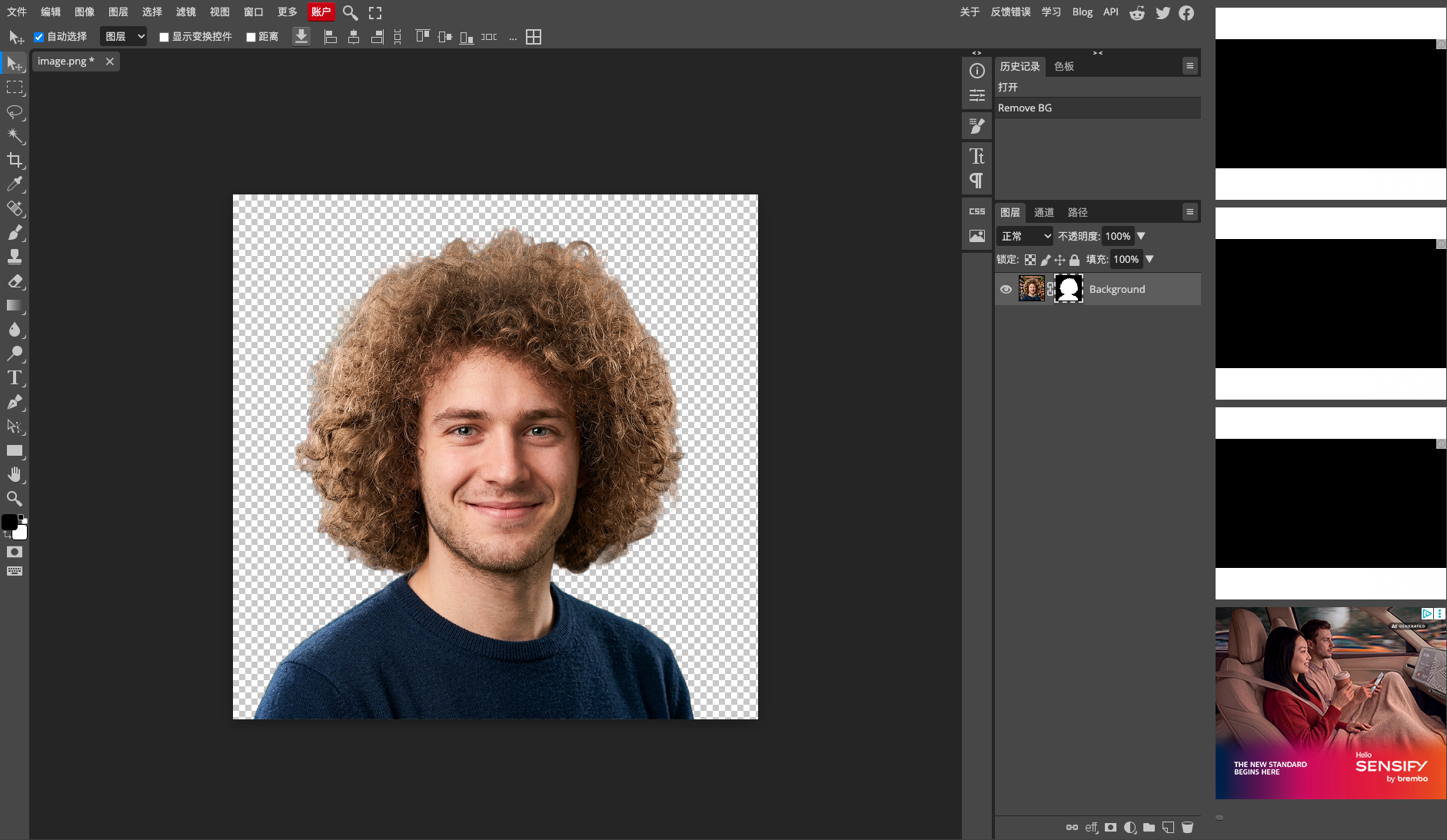
| Background removal | 93/100 2048 × 2048 (4.96 MB original RGBA PNG) · Historical description; output not attached | 73/100 1600 × 1600 · PNG | Active task |
| Image compression | 94/100 JPEG · Output attached | Not tested in topic | Compare in task topic → |
| Image vectorization | 99/100 SVG · Output attached | Not tested in topic | Compare in task topic → |
Select at least 2 tools to compare
You can also filter a task page first, then compare your shortlist.
Browse this task →| Criterion | Photopea AI Background Remover Background removal 93/100 Seven-aspect task score Benchmark browser-native image suite powered by WebAssembly, delivering free signup-free 2048×2048 watermark-free transparent PNGs; watching a 30s rewarded ad unlocks exceptional curly hair matting precision (99.7% recall). Tested export 2048 × 2048 (4.96 MB original RGBA PNG) · Historical description; output not attached Historical test · 2026-11-03 | EveryTool4U (Remove Background) Background removal 73/100 Seven-aspect task score EveryTool4U is a 100% free browser toolkit running on-device WebAssembly without accounts; its background remover delivered an unwatermarked 1600×1600 transparent PNG in 11.38s locally, achieving 99.85% foreground recall with zero cloud image upload. Tested export 1600 × 1600 · PNG Historical test · 2026-11-01 |
|---|---|---|
| Pricing & rules | ||
| Pricing plans | Photopea Free and Premium pass structure · 2026-10-30 Plan · source date Monthly / one-time Annual bill / period Quota & limits Free2026-10-30 ↗ Free Free Free 100% complete feature access, unlimited local client-side exports, 0.5 GB PeaDrive, ad-supported PSD/AI/XD/PDF editing, AI background removal, adjustment layers, bitmap vectorizer Premium Single User (30 Days)2026-10-30 ↗ EUR 8/month — Monthly Single user 30 days ad-free, 5 GB PeaDrive, 3,000 AI credits, 2x history steps No ads, one-time payment with no auto-renewal, reverts to free on expiry Premium Single User (365 Days)2026-10-30 ↗ — EUR 50/year Annual Single user 365 days ad-free (€4.17/mo equiv), 5 GB PeaDrive, 3,000 monthly AI credits Full-year ad-free experience, one-time payment without recurring billing 3 plan / billing-period records, all listed; — means that period is not recorded. Free tier grants 100% feature access with ads; Premium passes are one-time non-recurring purchases (€8/30d, €15/90d, €50/365d) returning to free upon expiry. Cancellation, sources & verification recordCancellation and refund terms unverified Photopea Official Premium Pricing Modal ↗ · 2026-10-30 Capture 1 ↗ | EveryTool4U platform tool authorization and service pricing · 2026-11-01 Plan · source date Monthly / one-time Annual bill / period Quota & limits Free Tier2026-11-01 ↗ Free Free Free Unlimited usage across 109 online tools with no daily quota or queue limits Includes PDF merge, split, compression, Word conversion, OCR, image compression, background removal, and office utilities;Client-side processing; performance on large files depends on local device RAM and browser limits;No account registration or renewal required;Permanent access 1 plan / billing-period records, all listed; — means that period is not recorded. All tools are completely free indefinitely without registration or subscriptions; most tasks execute entirely on-device. Cancellation, sources & verification recordCancellation and refund terms unverified EveryTool4U Official Homepage ↗ · 2026-11-01 Capture 1 ↗ EveryTool4U About and Privacy Architecture Page ↗ · 2026-11-01 Capture 1 ↗ |
| Free & trial allowance on the test date | Free users watch a single rewarded video ad to complete full-resolution AI export | All tools free without daily usage limits or queues |
| Cancellation & refunds | Not verified | Not verified |
| Disclosure of costs & limits | Explicitly informs user of ad requirement upon clicking Remove BG | Page clearly states 'Everything stays in your browser' with real-time model loading progress indicators |
| Task quality | ||
| Measured fixture results | Edge error MAD: 0.112 (Lower is better) · Global error SAD(k): 44.707 (Lower is better) · Foreground retention: 99.740% (Higher is better) · Background residue: 0.026% (Lower is better) | Edge error MAD: 0.1373 (Lower is better) · Global error SAD(k): 51.712 (Lower is better) · Foreground retention: 99.850% (Higher is better) · Background residue: 0.646% (Lower is better) |
| Fixture findings | Outstanding 2048px curly hair matting precision with 99.74% foreground recall and only 0.026% background leak, directly generating editable layer masks. | Fine curly-hair edge separation with 99.85% foreground recall and 0.65% background leak, scaled to 1600px with a genuine Alpha channel and zero watermarks. |
| Original historical observation | Photopea exports full 2048×2048 transparent PNG client-side with outstanding hair preservation (fg_recall = 99.74%, bg_leak = 0.026%), generating an editable layer mask. | EveryTool4U runs isnet_quint8 in WebAssembly via @imgly/background-removal: 11.38s local inference delivers 99.85% foreground recall and only 0.65% background leak; outputs clean 1600px PNG with genuine Alpha channel and zero cloud transmission. |
| Suitable uses · historical assessment | Designers and power users needing free 2048×2048 watermark-free transparent PNG exports with advanced in-browser layer editing | Privacy-conscious users needing quick on-device portrait background removal without cloud exposure |
| Result & output evidence | No native output obtained; the preview does not establish final export quality. | |
| Delivery capabilities | ||
| Recorded export specifications | 2048 × 2048 (4.96 MB original RGBA PNG) · Historical description; output not attached · Check watermark record No native output is attached; check the evidence for specification and watermark claims. | 1600 × 1600 · PNG · Check watermark record |
| Historical specification note · not an official maximum | 2048 × 2048 (4.96 MB original RGBA PNG) | 1600×1600 (PNG) |
| Watermark observation | Completely watermark-free | Completely free of visible watermarks |
| Batch & API | Full keyboard shortcuts, PSD/AI import/export, action scripts, and blend modes | Single-image workspace supporting AI Auto and Color Key modes with interactive tolerance sliders |
| Recorded free-tier dimensions | Not verified | 1600 × 1600 |
| Attached file dimensions | Not verified | 1600 × 1600 · PNG |
| Speed & reliability | ||
| Timing observation | Recorded local processing time: 15s · End-to-end reference: 50s | Network-observed server wait: 0s · End-to-end reference: 11.38s |
| Date & fixture | 2026-11-03 · anchor_bgremove_v1 · US-West (California, AS2914) | 2026-11-01 · anchor_bgremove_v1 · US-West (California, AS2914) |
| Repeated tests & reliability | No standardized repetition count, success rate or variability range is recorded. | No standardized repetition count, success rate or variability range is recorded. |
| Interaction experience | ||
| Account requirements | No login in this test | No login in this test |
| Sign-in methods | Completely usable without login | Immediate guest access with no accounts or passwords |
| Manual adjustment | Not verified | Not verified |
| Interaction observations | Not verified | Instant guest access with zero signups or ads blocking the canvas workflow; single-click Download button exports full 1600px PNG directly. |
| Background & reputation | ||
| Service lifecycle notice | Not verified | Not verified |
| Operator | Ivan Kutskir (Photopea) | EveryTool4U |
| Recorded origin | Czech Republic | Not verified |
| Domain history record | 2013–present | Not verified |
| Background & reputation assessment | Not verified | Inherited from EveryTool4U product baseline: Independent developer toolkit transparently disclosing open-source stack (@imgly/background-removal) and direct contact channels. |
| External reputation record | Not verified | Not verified |
| Engineering & privacy | ||
| Processing location | On-device processing | Uploaded for cloud processing |
| Third-party tracking record | Google AdSense · Google Analytics | Google Tag Manager · Google AdSense |
| Engineering & privacy assessment | Not verified | Executed purely client-side via WebAssembly (@imgly/background-removal running isnet_quint8); CDP network trace confirmed zero byte upload of images, achieving top-tier privacy compliance. |
| Retention statement | This flow runs locally; post-close deletion not independently verified | Explicit retention period unconfirmed; inspect policy record |
| Evaluation basis | ||
| Pricing transparency | 35 / 35 Inherited from EveryTool4U product baseline: All 109 online tools are 100% permanently free with no paywalls, accounts, or quotas; monetization and privacy limits are fully transparent. | |
| Interaction restraint | 30 / 30 Instant guest access with zero signups or ads blocking the canvas workflow; single-click Download button exports full 1600px PNG directly. | |
| Background & reputation | 13 / 20 Inherited from EveryTool4U product baseline: Independent developer toolkit transparently disclosing open-source stack (@imgly/background-removal) and direct contact channels. | |
| Engineering & privacy | 15 / 15 Executed purely client-side via WebAssembly (@imgly/background-removal running isnet_quint8); CDP network trace confirmed zero byte upload of images, achieving top-tier privacy compliance. | |
| Task quality | 58.5 / 65 Transition band error mad_band=0.112 · Global SAD(k)=44.707 · Foreground recall 99.74% / Background leak 0.026% | 35.8 / 65 Edge error mad_band=0.137 (18.9/35), global error SAD(k)=51.7 (7.2/15), subject recall 99.85% / background leak 0.646% (9.6/15). |
| Deliverable specifications | 20 / 20 True Alpha channel (8/8); Max deliverable spec: 2048 × 2048 (4.96 MB original RGBA PNG) | 18 / 20 True Alpha channel (8/8); verified native delivery reaches 1600×1600 resolution (client-side MAX=1600 constraint) (10/12). |
| Processing speed | 13 / 15 Network-observed server wait: 15s (API mode: client_wasm_neural_matting; network upload 0s / end-to-end 50s shown for reference only, never penalized) | 10 / 15 Client-side WebAssembly inference in 11.38s (zero upload network overhead, completely processed in browser memory) (10.0/15). |