See your options side by side
Choose one task and 2–4 tools. Compare pricing, output, test results and trust.
Test scope & comparison notes
These are recorded facts, not a unified ranking. Tested tiers and scope are not consistently recorded. Read pricing with its date and timing with its conditions. Privacy observations reflect visible flows and statements, not a security audit.
Cross-task capability coverage across selected products
Each product is scored independently per task edge; switch tasks below while keeping shared products selected| Task edge | iLovePDF | everytool4u.com | Switch / compare |
|---|---|---|---|
| Background removal | Not tested in topic | 73/100 1600 × 1600 · PNG | Compare in task topic → |
| PDF to Word | 93/100 DOCX · Output attached | 81/100 DOCX · Output attached | Active task |
| PDF compression | 97/100 PDF · Output attached | 81/100 PDF · Output attached | |
| Scanned PDF OCR | 95/100 PDF · Output attached | 96/100 PDF · Output attached | |
| PDF merge & split | 97/100 PDF · Output attached | 97/100 PDF · Output attached |
Select at least 2 tools to compare
You can also filter a task page first, then compare your shortlist.
Browse this task →| Criterion | iLovePDF PDF to Word 93/100 Seven-aspect task score Smooth login-free downloads retain text and tables and offer deletion; free text conversion and paid OCR are distinguished upfront, with scans untested. Tested export DOCX · Output attached Historical test · 2026-10-18 | EveryTool4U PDF to Word 81/100 Seven-aspect task score EveryTool4U provides a 100% login-free client-side PDF to Word tool running entirely in the browser, exporting editable DOCX in 0.33s with zero uploads. Tested export DOCX · Output attached Historical test · 2026-11-05 |
|---|---|---|
| Pricing & rules | ||
| Pricing plans | iLovePDF USD single-seat web plans; 25+ users quoted · 2026-10-20 Plan · source date Monthly / one-time Annual bill / period Quota & limits Basic2026-10-20 ↗ Free Free Free Basic tools; limited documents, batching and file size, without numeric limits. Premium2026-10-20 ↗ USD 9/month USD 60/year Monthly Single seat; unlimited document processing across web, mobile and desktop, with batching; 2,000 AI credits are not a conversion count. Annual Single-seat annual bill USD 60; same capabilities as monthly. Education eligibility plan2026-10-20 ↗ — USD 0/year Annual Students and academics can apply for one free year of Premium, subject to eligibility. 5 plan / billing-period records, all listed; — means that period is not recorded. Monthly and annual controls confirm USD 9/month and USD 60/year. Free processing is limited without exact figures; education and seat discounts require eligibility checks. Verification has gaps; unknown prices and quotas are not inferred. Cancellation, sources & verification recordUpgrade, downgrade or cancel in account settings. The page says prices include applicable VAT, with regional invoice treatment. Refund terms were not separately verified. Official feature and pricing page ↗ · 2026-10-20 Capture 1 ↗ Official feature and pricing page ↗ · 2026-10-20 Capture 1 ↗ | EveryTool4U platform tool authorization and service pricing · 2026-11-01 Plan · source date Monthly / one-time Annual bill / period Quota & limits Free Tier2026-11-01 ↗ Free Free Free Unlimited usage across 109 online tools with no daily quota or queue limits Includes PDF merge, split, compression, Word conversion, OCR, image compression, background removal, and office utilities;Client-side processing; performance on large files depends on local device RAM and browser limits;No account registration or renewal required;Permanent access 1 plan / billing-period records, all listed; — means that period is not recorded. All tools are completely free indefinitely without registration or subscriptions; most tasks execute entirely on-device. Cancellation, sources & verification recordCancellation and refund terms unverified EveryTool4U Official Homepage ↗ · 2026-11-01 Capture 1 ↗ EveryTool4U About and Privacy Architecture Page ↗ · 2026-11-01 Capture 1 ↗ |
| Free & trial allowance on the test date | Free tier converts standard digital PDFs without login; scanned OCR and large batches require Premium | Entire platform free without task limits or quotas |
| Cancellation & refunds | Upgrade, downgrade or cancel in account settings. The page says prices include applicable VAT, with regional invoice treatment. Refund terms were not separately verified. | Not verified |
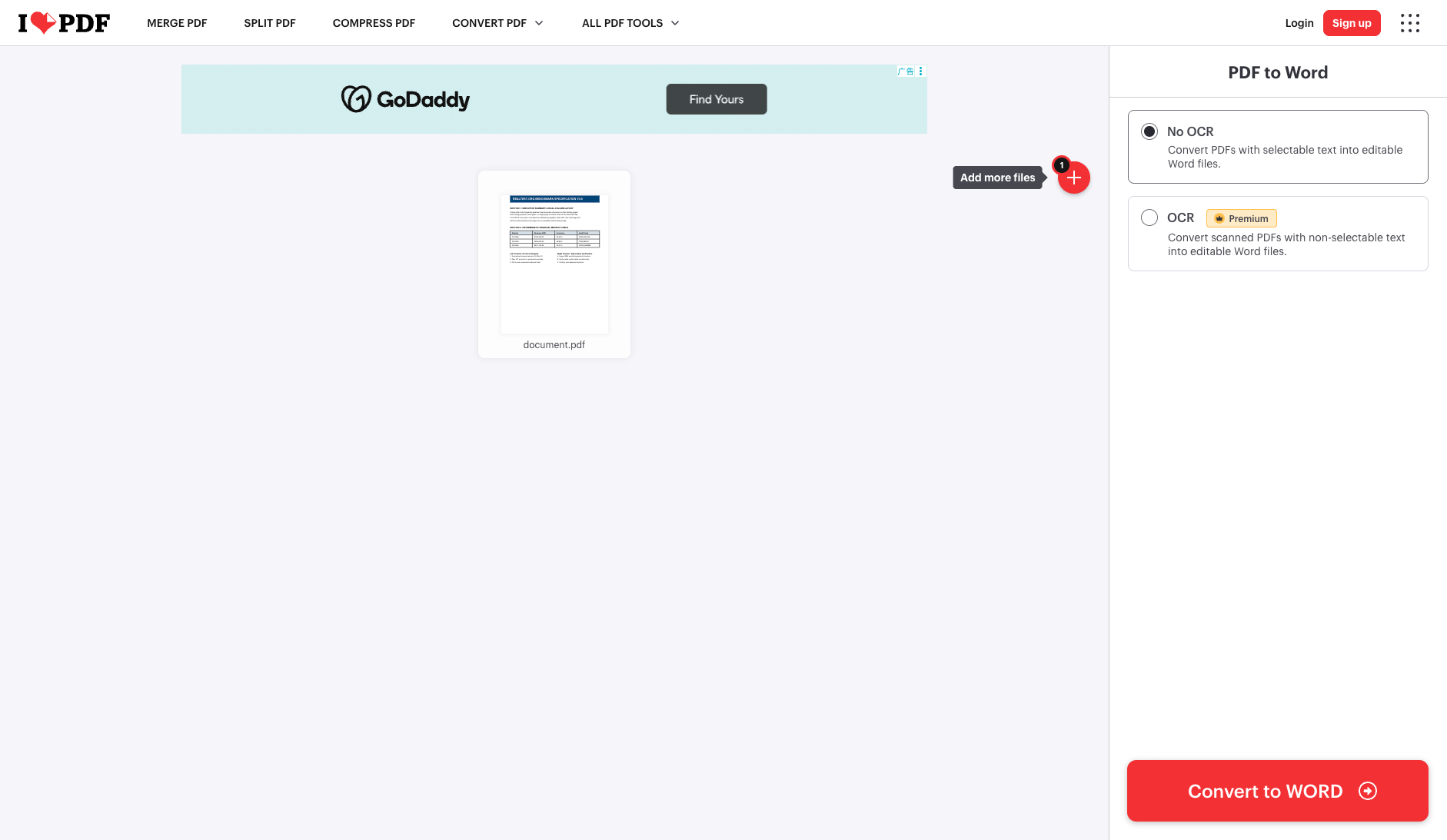
| Disclosure of costs & limits | Clearly labels No OCR (Free) vs OCR (Premium) on the right panel before clicking Convert | Immediate processing with live text preview and direct download button |
| Task quality | ||
| Measured fixture results | Text retained: 100% · Editable table cells: 16 · Page 2 preserved: Yes | Text retained: 100% · Editable table cells: 0 · Page 2 preserved: Yes |
| Fixture findings | Text and tables were retained for this text PDF; scan OCR is a separate paid capability and was not tested. | Under anchor_pdf2word_v1, it produced an 8.1 KB editable Word document with 100% text retention; tables are rendered as formatted text lines without native grid. |
| Original historical observation | iLovePDF states its free vs. paid OCR boundary upfront before you click convert, and its 3.2s auto-downloaded 10.0 KB .docx achieves 100% text retention and 16-cell native Word table reconstruction upon XML inspection (02_workspace.png, 03_download.png). | EveryTool4U converted the test PDF into an 8.1 KB editable Word document in 0.33s using client-side JavaScript, retaining 100% text with zero watermarks. |
| Suitable uses · historical assessment | Professionals and students seeking fast (3.2s auto-download), high-fidelity conversion of standard digital PDF documents without logging in | Privacy-conscious users needing quick extraction of PDF text into editable Word without cloud uploads |
| Result & output evidence | ||
| Scans / OCR | The fixture is a text PDF; scans and OCR were not tested | The fixture is a text PDF; scans and OCR were not tested |
| Delivery capabilities | ||
| Recorded export specifications | DOCX · Output attached · No watermark in test | DOCX · Output attached · No watermark in test |
| Historical specification note · not an official maximum | Full 2-page native .docx (44 paragraphs + 16-cell native Word table, watermark-free) | Full 2-Page Watermark-Free Editable DOCX (8.1 KB · 100% Text Retention) |
| Watermark observation | Watermark-free | Watermark-free |
| Batch & API | Supports Google Drive / Dropbox integration and developer REST API | Supports Editable Text and Preserve Layout modes |
| Recorded free-tier dimensions | Not verified | Not verified |
| Attached file dimensions | Not verified | Not verified |
| Published allowances & file limits · not tested | Basic: Basic tools; limited documents, batching and file size, without numeric limits. | Free Tier: Unlimited usage across 109 online tools with no daily quota or queue limits · Includes PDF merge, split, compression, Word conversion, OCR, image compression, background removal, and office utilities · Client-side processing; performance on large files depends on local device RAM and browser limits |
| Speed & reliability | ||
| Timing observation | Network-observed server wait: 3.2s · End-to-end reference: 3.7s | Recorded local processing time: 0s · End-to-end reference: 0.33s |
| Date & fixture | 2026-10-18 · anchor_pdf2word_v1 · US-West (California, AS2914) | 2026-11-05 · anchor_pdf2word_v1 · Client-Side (WASM / Browser Local) |
| Repeated tests & reliability | No standardized repetition count, success rate or variability range is recorded. | No standardized repetition count, success rate or variability range is recorded. |
| Interaction experience | ||
| Account requirements | No login in this test | No login in this test |
| Sign-in methods | No login required for standard selectable-text PDF conversion | 100% login-free local execution and export |
| Manual adjustment | Not verified | Not verified |
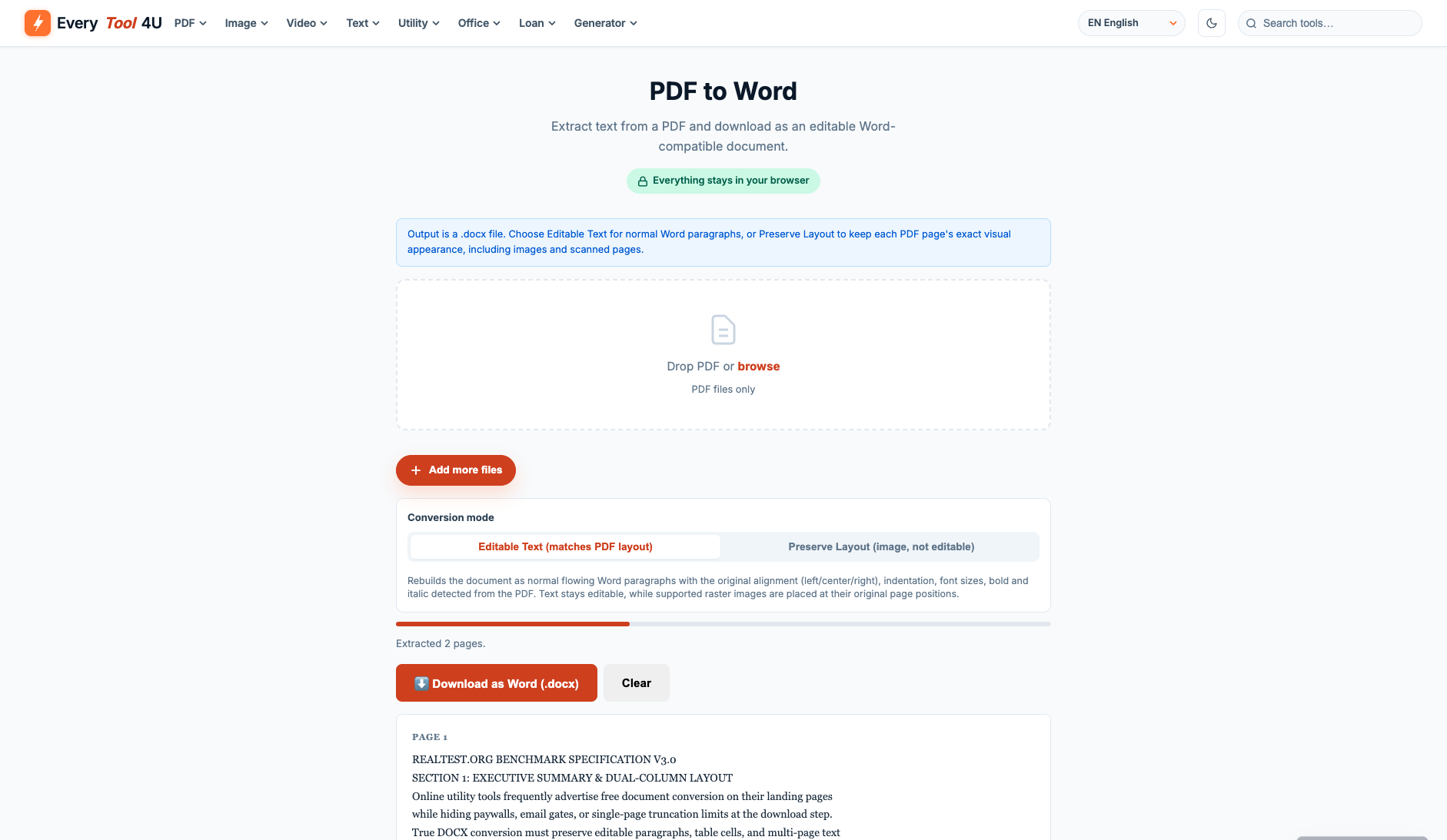
| Interaction observations | Uploading without login and clicking Convert to WORD reaches the download screen in ~3.2s, triggers automatic browser download, and offers a one-click server delete button. | Clean utility UI with Editable Text vs Layout modes, live text extraction preview, and instant DOCX download (02_result.png, 03_download.png). |
| Background & reputation | ||
| Service lifecycle notice | Not verified | Not verified |
| Operator | iLovePDF (ilovepdf.com) | EveryTool4U |
| Recorded origin | Barcelona, Spain | United States / Independent Developer |
| Domain history record | 2010–Present (16-year global PDF utility leader) | Launched in 2026 |
| Background & reputation assessment | Independently operated in Barcelona, Spain since 2010 with ISO/IEC 27001 certification. | Independent developer platform launched in 2026 disclosing open-source libraries transparently. |
| External reputation record | Not verified | Not verified |
| Engineering & privacy | ||
| Processing location | Uploaded for cloud processing | On-device processing |
| Third-party tracking record | Not verified | Google AdSense · Google Tag Manager |
| Engineering & privacy assessment | End-to-end HTTPS encryption with an instant file-wipe trash button on the download screen and automatic server deletion within 2 hours. | 100% client-side PDF.js and JSZip execution; zero document upload to external servers. |
| Retention statement | Claims deletion within 2 hours; deletion not independently verified | This flow runs locally; post-close deletion not independently verified |
| Evaluation basis | ||
| Pricing transparency | 32 / 35 Upfront on the pre-conversion sidebar, iLovePDF clearly distinguishes free 'No OCR (Convert PDFs with selectable text to editable Word files)' from Crown-badged 'OCR (Scanned PDFs, Premium)', never ambushing users with a paywall after conversion (01_landing.png, 02_workspace.png, 03_download.png). | 35 / 35 100% free with no login, subscription, or paywall traps (01_landing.png). |
| Interaction restraint | 27 / 30 Uploading without login and clicking Convert to WORD reaches the download screen in ~3.2s, triggers automatic browser download, and offers a one-click server delete button. | 28 / 30 Clean utility UI with Editable Text vs Layout modes, live text extraction preview, and instant DOCX download (02_result.png, 03_download.png). |
| Background & reputation | 19 / 20 Independently operated in Barcelona, Spain since 2010 with ISO/IEC 27001 certification. | 13 / 20 Independent developer platform launched in 2026 disclosing open-source libraries transparently. |
| Engineering & privacy | 14 / 15 End-to-end HTTPS encryption with an instant file-wipe trash button on the download screen and automatic server deletion within 2 hours. | 15 / 15 100% client-side PDF.js and JSZip execution; zero document upload to external servers. |
| Task quality | 62 / 65 Underlying word/document.xml inspection confirms 100.0% text retention, Page 2 preservation, and 16-cell native Word <w:tbl> reconstruction with faithful typography and margins (62.0/65) | 45 / 65 Deterministic OOXML DOCX inspection: exported 8.1 KB DOCX retaining 100% text (4/4 headings, 12/12 table values, 3/3 body paragraphs, Page 2 token); tables flattened into aligned paragraphs without native <w:tbl> grid (45.0/65) |
| Deliverable specifications | 18 / 20 Exports a complete watermark-free .docx file (10.0 KB) without login; only scanned OCR and heavy batch concurrency require Premium (18.0/20) | 17 / 20 Free export of standard editable DOCX without watermarks or page limits (17.0/20) |
| Processing speed | 13.5 / 15 Fast cloud PDF-to-DOCX engine completes in ~3.2s and auto-triggers download (13.5/15) | 15 / 15 Client-side in-memory text parsing and DOCX packaging finished in 0.33s (15.0/15) |