See your options side by side
Choose one task and 2–4 tools. Compare pricing, output, test results and trust.
Test scope & comparison notes
These are recorded facts, not a unified ranking. Tested tiers and scope are not consistently recorded. Read pricing with its date and timing with its conditions. Privacy observations reflect visible flows and statements, not a security audit.
Cross-task capability coverage across selected products
Each product is scored independently per task edge; switch tasks below while keeping shared products selected| Task edge | XConvert | 11zon | Switch / compare |
|---|---|---|---|
| Image compression | 88/100 2048 × 2048 · PNG | 81/100 2048 × 2048 · PNG | Active task |
| PDF to Word | 93/100 Full 2-page .docx (8.6 KB, 43 paragraphs, 16/16 table cells) · Historical description; output not attached | 72/100 Legacy OLE2 .doc (25.5 KB, 0 native tables) · Historical description; output not attached | |
| PDF compression | 94/100 PDF · Output attached | 75/100 PDF · Output attached | |
| PDF merge & split | 94/100 PDF · Output attached | 95/100 PDF · Output attached |
Select at least 2 tools to compare
You can also filter a task page first, then compare your shortlist.
Browse this task →| Criterion | XConvert Compress PNG Image compression 88/100 Seven-aspect task score Free login-free target-size compression retains full-size PNG and offers deletion; it uses cloud processing and shows sharing and review prompts. Tested export 2048 × 2048 · PNG Historical test · 2026-10-19 | 11zon Image Compressor Image compression 81/100 Seven-aspect task score Free login-free compression runs quickly on-device, but default settings produce banding and several extension ads resemble download buttons. Tested export 2048 × 2048 · PNG Historical test · 2026-10-18 |
|---|---|---|
| Pricing & rules | ||
| Pricing plans | XConvert USD web Basic / Pro and free conversion · 2026-10-20 Plan · source date Monthly / one-time Annual bill / period Quota & limits Web free2026-10-20 ↗ Free Free Free Free PDF-to-DOCX without watermarks; no OCR. PDF-specific count and size limits are not separately listed. Basic2026-10-20 ↗ USD 4.99/month USD 49.99/year Monthly 1 GB files; 10 concurrent non-video tasks; 4 hours/task; 8 processing hours/day. Annual 1 GB files; 10 concurrent non-video tasks; 4 hours/task; 8 processing hours/day. Pro2026-10-20 ↗ USD 9.99/month USD 99.99/year Monthly 4 GB files; 25 concurrent non-video tasks; 4 hours/task; 24 processing hours/day. Annual 4 GB files; 25 concurrent non-video tasks; 4 hours/task; 24 processing hours/day. 5 plan / billing-period records, all listed; — means that period is not recorded. Monthly and actual annual bills appear on one pricing page. Daily video counts are not PDF allowances. The PDF-to-DOCX page explicitly says it does not perform OCR. Verification has gaps; unknown prices and quotas are not inferred. Cancellation, sources & verification recordCancel anytime in the User Portal; no refunds, with access through the paid period. Official feature and pricing page ↗ · 2026-10-20 Capture 1 ↗ Official feature and pricing page ↗ · 2026-10-20 Capture 1 ↗ | 11zon web PDF-to-Word free tool · 2026-10-20 Plan · source date Monthly / one-time Annual bill / period Quota & limits Web free2026-10-20 ↗ Free Free Free Free conversion; the page says multiple PDFs can be converted together. Numeric page and file-size limits are not listed. 1 plan / billing-period records, all listed; — means that period is not recorded. The official tool page states free, unlimited conversion. Numeric size and page limits are not published; the claim is not a guarantee for arbitrary files. Cancellation, sources & verification recordCancellation and refund terms follow official checkout and help policies. Official feature and pricing page ↗ · 2026-10-20 Capture 1 ↗ |
| Free & trial allowance on the test date | Free no-login compression and export for standard files; oversized files and priority queues require Pro | Free batch compression with both percentage Slider and target-KB Size tabs and no daily cap |
| Cancellation & refunds | Cancel anytime in the User Portal; no refunds, with access through the paid period. | Cancellation and refund terms follow official checkout and help policies. |
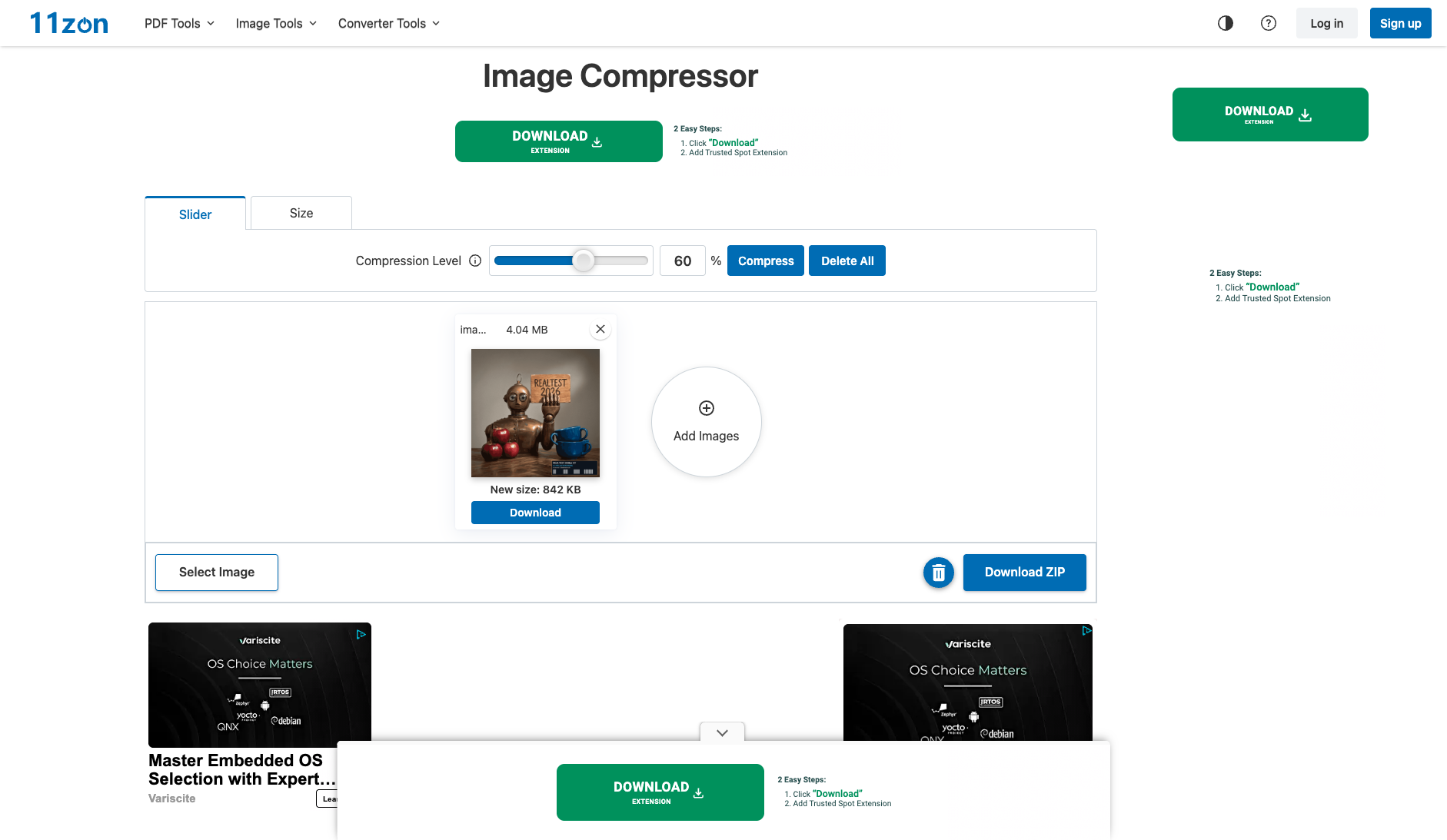
| Disclosure of costs & limits | Workspace options and download queue status are transparent | Automatically compresses at the default 60% level upon upload and displays 'New size: 842 KB' |
| Task quality | ||
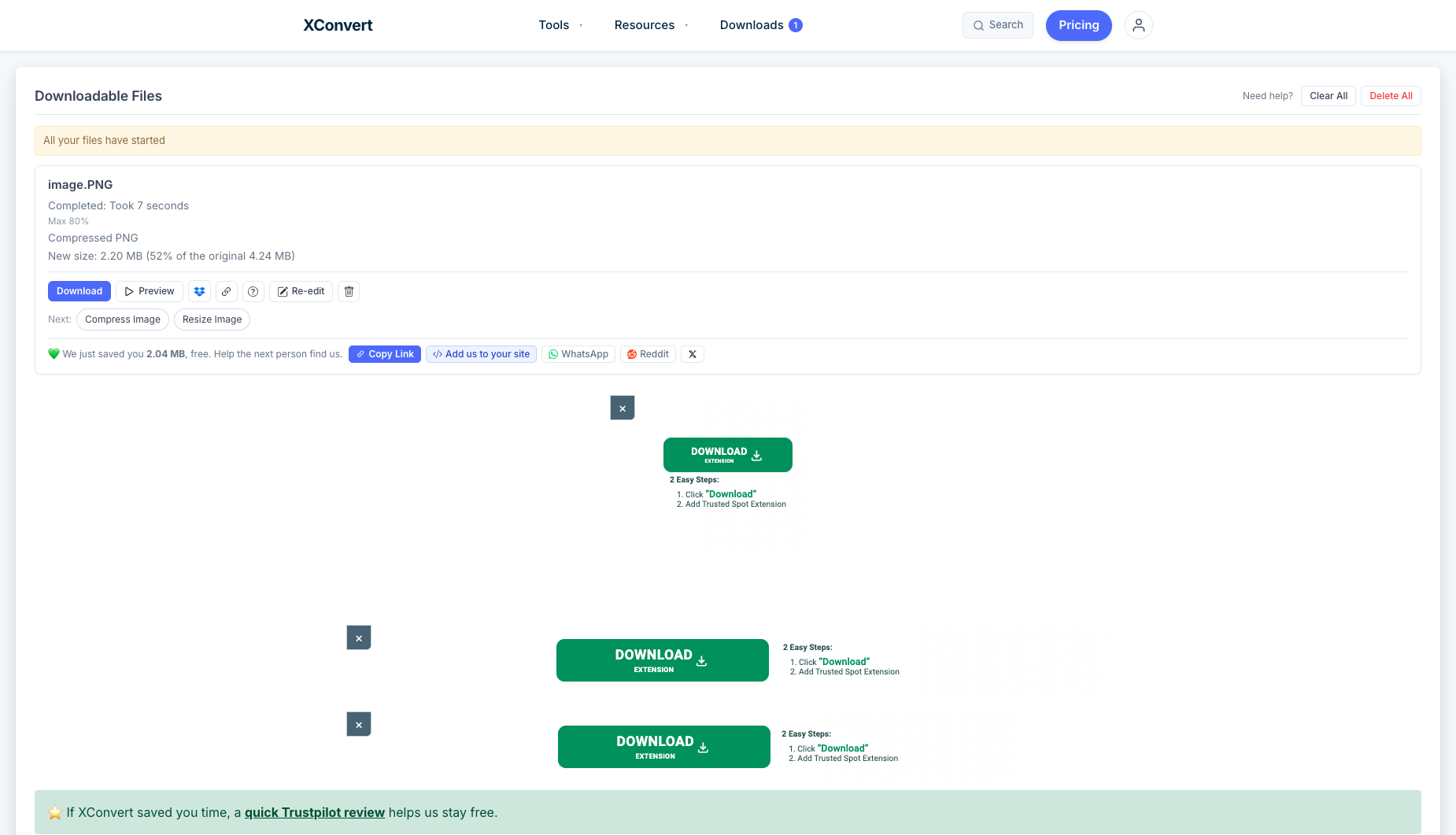
| Measured fixture results | File reduction: 48.14% · Output size: 2146.1 KB | File reduction: 79.65% · Output size: 842 KB |
| Fixture findings | Exported full-size PNG with about 48% size reduction in this test; other files need separate tests. | Strong size reduction suits upload limits; gradients show banding and download ads need care. |
| Original historical observation | XConvert offers a remarkably clean, ad-free interface. Uploading our 4.14 MB anchor PNG completes edge compression in 7 seconds, exporting a 2.15 MB native PNG (-48.14%) at PSNR=38.55 dB and SSIM=0.9981 (02_workspace.png, 03_download.png). | 11zon offers a very handy dual-tab interface ('Slider' by % and 'Size' by target KB), shrinking our 4.14 MB PNG down to 842 KB (-79.65%) in 1.8s at its default 60% level; however, the aggressive palette cut causes visible gradient banding (PSNR=32.83 dB) and users must dodge 3 green 'DOWNLOAD EXTENSION' fake ad buttons (02_workspace.png). |
| Suitable uses · historical assessment | Users who want a clean ad-free interface with post-compression online Preview and Re-edit capabilities | Users facing strict government or academic portal upload limits (e.g., forcing a large PNG under 1 MB or an exact KB target) who can tolerate mild background gradient banding |
| Result & output evidence | ||
| Delivery capabilities | ||
| Recorded export specifications | 2048 × 2048 · PNG · No watermark in test | 2048 × 2048 · PNG · No watermark in test |
| Historical specification note · not an official maximum | 2048×2048 (native resolution watermark-free PNG direct export) | 2048×2048 (no-login native-resolution watermark-free PNG, supports % Slider and target-KB modes) |
| Watermark observation | Watermark-free | Watermark-free |
| Batch & API | Supports multi-file queue uploads and unified `/downloads` management | Supports batch drag-and-drop and one-click Download ZIP; no public API |
| Recorded free-tier dimensions | 2048 × 2048 | 2048 × 2048 |
| Attached file dimensions | 2048 × 2048 · PNG | 2048 × 2048 · PNG |
| Speed & reliability | ||
| Timing observation | Network-observed server wait: 7s · End-to-end reference: 9.1s | Recorded local processing time: 1.8s · End-to-end reference: 1.8s |
| Date & fixture | 2026-10-19 · anchor_compress_v1 · US-West (California, AS2914) | 2026-10-18 · anchor_compress_v1 · US-West (California, AS2914) |
| Repeated tests & reliability | No standardized repetition count, success rate or variability range is recorded. | No standardized repetition count, success rate or variability range is recorded. |
| Interaction experience | ||
| Account requirements | No login in this test | No login in this test |
| Sign-in methods | No login required; optional account sign-in available | No login required; optional account sign-in in the top header |
| Manual adjustment | Not verified | Not verified |
| Interaction observations | Clean ad-free workspace; the downloads page only shows gentle backlink-sharing and Trustpilot review cards. | While the tool itself has no paywall, the workspace is surrounded by 3 green 'DOWNLOAD EXTENSION (2 Easy Steps: 1. Click "Download" 2. Add Trusted Spot Extension)' fake download ad buttons at the top, right sidebar, and sticky bottom bar (02_workspace.png). |
| Background & reputation | ||
| Service lifecycle notice | Not verified | Not verified |
| Operator | XConvert (xconvert.com) | 11zon.com |
| Recorded origin | Online File Conversion & Compression Provider | India / Global multilingual utility network |
| Domain history record | 2018–Present (8 years in operation) | 2021–Present |
| Background & reputation assessment | Operated by the XConvert team since 2018 on AWS EC2 edge clusters. | Fast-growing multilingual utility network covering PDF and image processing sub-sites. |
| External reputation record | Not verified | Not verified |
| Engineering & privacy | ||
| Processing location | Processing location unconfirmed | On-device processing |
| Third-party tracking record | Not verified | Not verified |
| Engineering & privacy assessment | Provides one-click Delete All / Clear All buttons on the `/downloads` queue page so users can immediately purge processed files from edge servers. | Underlying Blob URL inspection confirms that 11zon compresses images locally inside browser memory (~1.8s) without uploading original photos to a remote server. |
| Retention statement | Explicit retention period unconfirmed; inspect policy record | This flow runs locally; post-close deletion not independently verified |
| Evaluation basis | ||
| Pricing transparency | 30.5 / 35 Provides rich free compression settings (percentage quality, target file size, or lossless, 01_landing.png, 02_workspace.png); clicking Compress without login navigates to `/downloads` and immediately offers a free Download button ('New size: 2.20 MB, 52% of the original 4.24 MB', 03_download.png) with zero paywall locks. | 31.5 / 35 100% free without login: uploading the 4.14 MB (2048×2048) anchor image immediately unlocks individual Download and batch Download ZIP buttons with zero paywalls or watermarks (01_landing.png, 02_workspace.png, 03_download.png). |
| Interaction restraint | 25.5 / 30 Clean ad-free workspace; the downloads page only shows gentle backlink-sharing and Trustpilot review cards. | 17.5 / 30 While the tool itself has no paywall, the workspace is surrounded by 3 green 'DOWNLOAD EXTENSION (2 Easy Steps: 1. Click "Download" 2. Add Trusted Spot Extension)' fake download ad buttons at the top, right sidebar, and sticky bottom bar (02_workspace.png). |
| Background & reputation | 16.5 / 20 Fast-growing multilingual utility network covering PDF and image processing sub-sites. | |
| Engineering & privacy | 13 / 15 Provides one-click Delete All / Clear All buttons on the `/downloads` queue page so users can immediately purge processed files from edge servers. | 14.5 / 15 Underlying Blob URL inspection confirms that 11zon compresses images locally inside browser memory (~1.8s) without uploading original photos to a remote server. |
| Task quality | 58 / 65 Default 'Max 80%' setting preserves native 2048×2048 PNG format and shrinks 4,137.9 KB to 2,146.1 KB (48.14% reduction, 1.93× ratio) at PSNR = 38.55 dB and SSIM = 0.9981 (58.0/65) | 48 / 65 Defaults its 'Compression Level' slider to an aggressive 60%, slashing the 4,137.9 KB PNG down to 842.0 KB (-79.65%, 4.91× ratio) and offering a 'Size' tab for target-KB compression; however, aggressive palette reduction lowers PSNR to 32.83 dB (SSIM = 0.9928) with visible contour banding across the background wall gradient (48.0/65) |
| Deliverable specifications | 20 / 20 100% preserves 2048×2048 pixel dimensions and native PNG format without watermarks or login (20.0/20) | 19.5 / 20 Preserves 2048×2048 native resolution and PNG format without login or watermarks, supporting both single-file and ZIP exports (19.5/20) |
| Processing speed | 11.5 / 15 Edge server explicitly logs 'Completed: Took 7 seconds', delivering steady cloud performance (11.5/15) | 14.5 / 15 Local in-browser quantization completes in ~1.8s after file selection (14.5/15) |