See your options side by side
Choose one task and 2–4 tools. Compare pricing, output, test results and trust.
Test scope & comparison notes
These are recorded facts, not a unified ranking. Tested tiers and scope are not consistently recorded. Read pricing with its date and timing with its conditions. Privacy observations reflect visible flows and statements, not a security audit.
Cross-task capability coverage across selected products
Each product is scored independently per task edge; switch tasks below while keeping shared products selected| Task edge | RedKetchup | ResizePixel | Switch / compare |
|---|---|---|---|
| Image compression | 92/100 2048 × 2048 · PNG | 85/100 2048 × 2048 · PNG | Active task |
Select at least 2 tools to compare
You can also filter a task page first, then compare your shortlist.
Browse this task →| Criterion | RedKetchup Image Compressor Image compression 92/100 Seven-aspect task score On-device processing retains full size for free with detailed controls; ad blocking adds a 20-second export wait, avoidable by allowing ads or paying. Tested export 2048 × 2048 · PNG Historical test · 2026-10-19 | ResizePixel Image Compressor Image compression 85/100 Seven-aspect task score Free login-free target-size compression preserves quality and offers deletion; extension ads on the download page can be confused with the real button. Tested export 2048 × 2048 · PNG Historical test · 2026-10-18 |
|---|---|---|
| Pricing & rules | ||
| Pricing plans | RedKetchup web tools and ad-free Premium account (Free / $5 One-Year / $10 Lifetime); USD · 2026-10-21 Plan · source date Monthly / one-time Annual bill / period Quota & limits Free Web2026-10-21 ↗ Free Free Free Free unlimited compression for PNG/JPEG/WEBP/HEIC without login; includes ads and a support countdown when ad blockers are active. Premium One-Year2026-10-21 ↗ — USD 5/year Annual USD 5 for 1 year of Premium access: removes ads (No ads) and skips download previews/countdowns (Skip previews). Premium Lifetime2026-10-21 ↗ USD 10 · one-time payment Usage / one-time Usage / one-time USD 10 one-time Lifetime Premium access: removes ads (No ads) and skips download previews/countdowns (Skip previews). 3 plan / billing-period records, all listed; — means that period is not recorded. RedKetchup online compression and bulk tools are free with all compression settings unlocked. Clicking Upgrade / REMOVE ADS opens the Upgrade to Premium modal offering two lightweight plans: USD 5 One-Year and USD 10 Lifetime to remove ads and skip download previews/countdowns. Cancellation, sources & verification recordFree tier requires no login; Premium offers USD 5 One-Year and USD 10 one-time Lifetime upgrades under official Terms. RedKetchup online compressor page and Upgrade to Premium modal ↗ · 2026-10-21 Capture 1 ↗ | ResizePixel online image compressor and editor web tool · 2026-10-21 Plan · source date Monthly / one-time Annual bill / period Quota & limits ResizePixel Free Web2026-10-21 ↗ Free Free Free Free without login for JPG/PNG/WEBP/GIF; supports auto compression and target KB/MB compression with unwatermarked export. 1 plan / billing-period records, all listed; — means that period is not recorded. The official tool page provides free, no-login online compression for JPG, PNG, WEBP, and GIF images (with auto optimization or target KB/MB compression), supported by display ads without a paywall. Cancellation, sources & verification recordAd-supported free tool with no accounts or subscription charges. ResizePixel official online image compressor page ↗ · 2026-10-21 Capture 1 ↗ |
| Free & trial allowance on the test date | Unlimited free local compression; adblock users wait a 20-second support countdown before final file export | 100% free with both Auto high-fidelity compression and exact Target KB/MB compression |
| Cancellation & refunds | Free tier requires no login; Premium offers USD 5 One-Year and USD 10 one-time Lifetime upgrades under official Terms. | Ad-supported free tool with no accounts or subscription charges. |
| Disclosure of costs & limits | Workspace settings and adblock countdown notice are clear and upfront | 100% free throughout the entire workflow |
| Task quality | ||
| Measured fixture results | File reduction: 56.31% · Output size: 1807.8 KB | File reduction: 49.63% · Output size: 2084.2 KB |
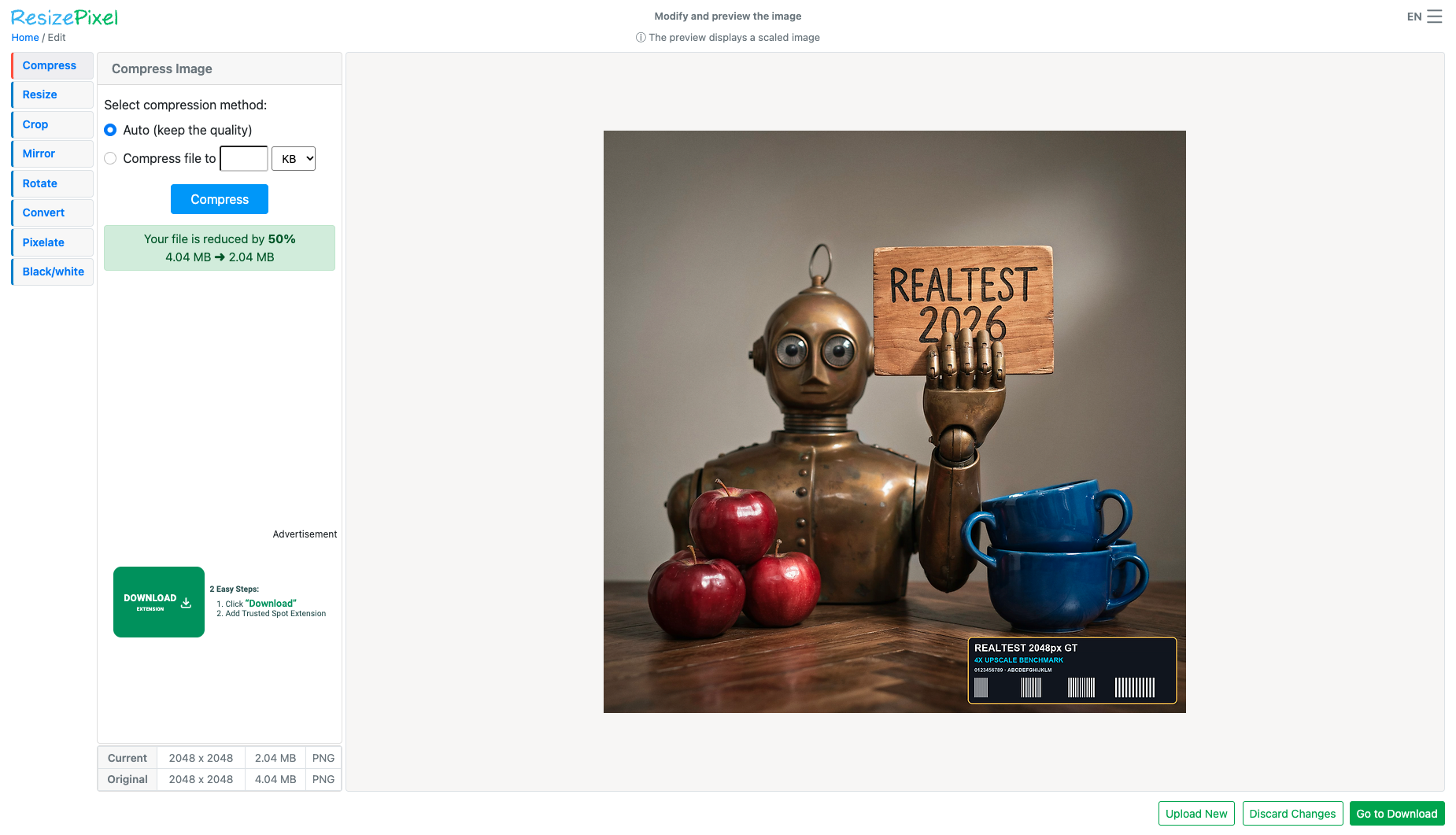
| Fixture findings | Local processing reduced this fixture by about 56% with adjustable quantisation; useful if you want parameter control. | Reduced this fixture by about 50% with detail retained; avoid the sidebar ad resembling a download button. |
| Original historical observation | RedKetchup is one of the few tools that lets users manually pick 8-bit quantization dithering algorithms (Atkinson) and inspect pixels side-by-side in a full-screen viewer: it shrinks our 4.14 MB anchor PNG by 56.31% to 1.77 MB locally at PSNR=39.35 dB and SSIM=0.9984 (02_workspace.png, 03_download.png). | ResizePixel delivers remarkable quality in Auto (keep the quality) mode: shrinking our 4,137.9 KB PNG by 49.63% to 2,084.2 KB in 7.6s while maintaining a near-lossless 43.94 dB PSNR and 0.9994 SSIM (02_workspace.png). Users just need to ignore the green 'DOWNLOAD EXTENSION' ad on the left and click the real 'Go to Download / Download Image' button at the bottom right (03_download.png). |
| Suitable uses · historical assessment | Developers and UI designers who want fine-grained control over PNG color depth (8/24/32-bit) and dithering algorithms with 100% local browser privacy | Users who demand near-lossless visual quality (43.94 dB PSNR) or need to shrink an image to an exact KB ceiling for government/exam portals |
| Result & output evidence | ||
| Delivery capabilities | ||
| Recorded export specifications | 2048 × 2048 · PNG · No watermark in test | 2048 × 2048 · PNG · No watermark in test |
| Historical specification note · not an official maximum | 2048×2048 (native resolution watermark-free PNG direct export) | 2048×2048 full-resolution PNG free direct export (supports exact target KB/MB compression) |
| Watermark observation | Watermark-free | Watermark-free |
| Batch & API | Offers a dedicated Bulk Image Resizer page; no external cloud API | Single-image precision workflow (no multi-file batch zip) |
| Recorded free-tier dimensions | 2048 × 2048 | 2048 × 2048 |
| Attached file dimensions | 2048 × 2048 · PNG | 2048 × 2048 · PNG |
| Speed & reliability | ||
| Timing observation | Recorded local processing time: 2.2s · End-to-end reference: 2.2s | Network-observed server wait: 5.4s · End-to-end reference: 7.6s |
| Date & fixture | 2026-10-19 · anchor_compress_v1 · US-West (California, AS2914) | 2026-10-18 · anchor_compress_v1 · US-West (California, AS2914) |
| Repeated tests & reliability | No standardized repetition count, success rate or variability range is recorded. | No standardized repetition count, success rate or variability range is recorded. |
| Interaction experience | ||
| Account requirements | No login in this test | No login in this test |
| Sign-in methods | No login required; optional $5 ad-free account login | No registration or login required (no account system) |
| Manual adjustment | Not verified | Not verified |
| Interaction observations | Offers industry-leading granular controls for PNG bit depth (8-bit / 24-bit / 32-bit) and dithering algorithms (Atkinson / Floyd-Steinberg / Sierra) plus a split-screen inspector; the only friction is the 20s timer when ads are blocked. | Both the editor and download screen display a deceptive green 'DOWNLOAD EXTENSION — 2 Easy Steps: 1. Click Download 2. Add Trusted Spot Extension' ad banner on the left sidebar (02_workspace.png, 03_download.png), whereas the real green 'Go to Download / Download Image' button sits in the bottom-right corner. |
| Background & reputation | ||
| Service lifecycle notice | Not verified | Not verified |
| Operator | RedKetchup (redketchup.io) | ResizePixel |
| Recorded origin | Independent Developer Toolkit | Ukraine |
| Domain history record | 2021–Present | 2019–Present (dedicated lightweight online image editor) |
| Background & reputation assessment | Well-regarded independent frontend image processing toolkit (Image Resizer, Compressor, Icon Editor) actively maintained since 2021. | Operated by an independent Ukrainian web utility team focused on lightweight browser image tools. |
| External reputation record | Not verified | Not verified |
| Engineering & privacy | ||
| Processing location | On-device processing | Uploaded for cloud processing |
| Third-party tracking record | Not verified | Not verified |
| Engineering & privacy assessment | 100% client-side browser Web Worker and HTML5 Canvas execution—all PNG palette quantization and Atkinson dithering happen locally in browser memory (Blob URL) with zero server uploads. | Download page explicitly states 'The download will be valid for 30 minutes' and provides a red '❌ Delete Now' button for immediate manual server deletion (03_download.png). |
| Retention statement | This flow runs locally; post-close deletion not independently verified | Claims deletion within 30 minutes; deletion not independently verified |
| Evaluation basis | ||
| Pricing transparency | 31.5 / 35 Completely free and requires no sign-up (01_landing.png, 02_workspace.png); when an adblocker is active, clicking final Download displays a transparent notice ('The download will begin in 20 seconds. To avoid the countdown... Allow ads or upgrade for $5', 03_download.png) and automatically exports the full-resolution PNG once the timer finishes. | 32 / 35 100% free with zero paywalls or login gates, offering both 'Auto (keep the quality)' and 'Compress file to X KB/MB' modes (01_landing.png, 02_workspace.png). |
| Interaction restraint | 25.5 / 30 Offers industry-leading granular controls for PNG bit depth (8-bit / 24-bit / 32-bit) and dithering algorithms (Atkinson / Floyd-Steinberg / Sierra) plus a split-screen inspector; the only friction is the 20s timer when ads are blocked. | 17 / 30 Both the editor and download screen display a deceptive green 'DOWNLOAD EXTENSION — 2 Easy Steps: 1. Click Download 2. Add Trusted Spot Extension' ad banner on the left sidebar (02_workspace.png, 03_download.png), whereas the real green 'Go to Download / Download Image' button sits in the bottom-right corner. |
| Background & reputation | 18 / 20 Well-regarded independent frontend image processing toolkit (Image Resizer, Compressor, Icon Editor) actively maintained since 2021. | 16 / 20 Operated by an independent Ukrainian web utility team focused on lightweight browser image tools. |
| Engineering & privacy | 15 / 15 100% client-side browser Web Worker and HTML5 Canvas execution—all PNG palette quantization and Atkinson dithering happen locally in browser memory (Blob URL) with zero server uploads. | 13 / 15 Download page explicitly states 'The download will be valid for 30 minutes' and provides a red '❌ Delete Now' button for immediate manual server deletion (03_download.png). |
| Task quality | 60.5 / 65 Default Auto-Detect (8-bit + Atkinson dithering) preserves native PNG format and shrinks 4,137.9 KB to 1,807.8 KB (56.31% reduction, 2.29× ratio) with PSNR = 39.35 dB and SSIM = 0.9984 (60.5/65) | 57.2 / 65 Cuts PNG file size nearly in half (-49.63%, 1.99×) while preserving an extraordinary 43.94 dB PSNR and 0.9994 SSIM (57.2/65) |
| Deliverable specifications | 20 / 20 100% preserves 2048×2048 pixel dimensions and native PNG format without watermarks or login (20.0/20) | 19 / 20 Preserves full 2048×2048 resolution and native PNG format while supporting exact target-KB compression (19.0/20) |
| Processing speed | 12 / 15 Local Web Worker quantization and full-screen preview complete in ~2.2s (0s network upload; adblock users wait a 20s countdown before export) (12.0/15) | |