See your options side by side
Choose one task and 2–4 tools. Compare pricing, output, test results and trust.
Test scope & comparison notes
These are recorded facts, not a unified ranking. Tested tiers and scope are not consistently recorded. Read pricing with its date and timing with its conditions. Privacy observations reflect visible flows and statements, not a security audit.
Cross-task capability coverage across selected products
Each product is scored independently per task edge; switch tasks below while keeping shared products selected| Task edge | quickimagekit.com | CompressNow | Switch / compare |
|---|---|---|---|
| Image compression | 92/100 WEBP · Output attached | 83/100 PNG · Output attached | Active task |
Select at least 2 tools to compare
You can also filter a task page first, then compare your shortlist.
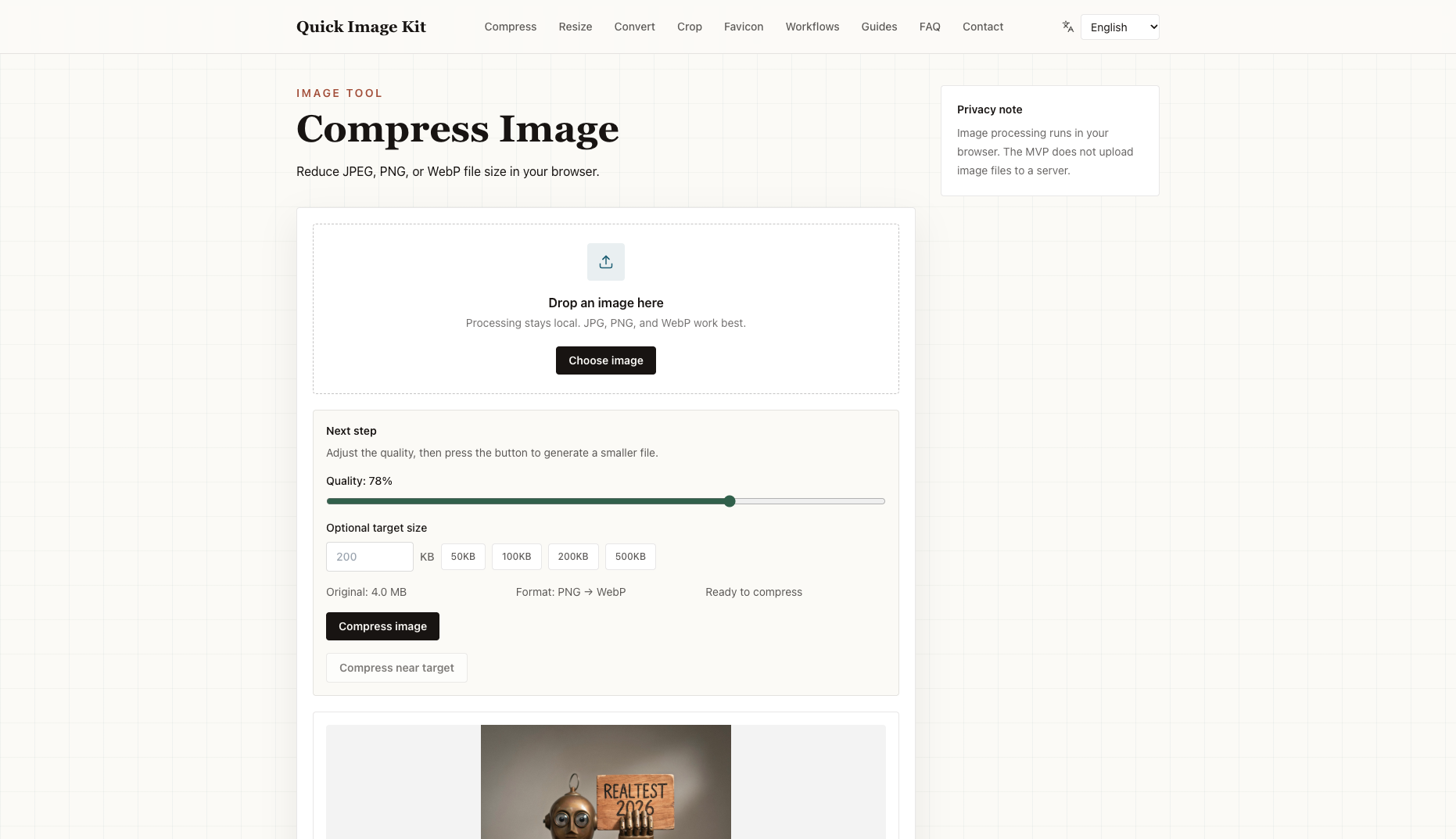
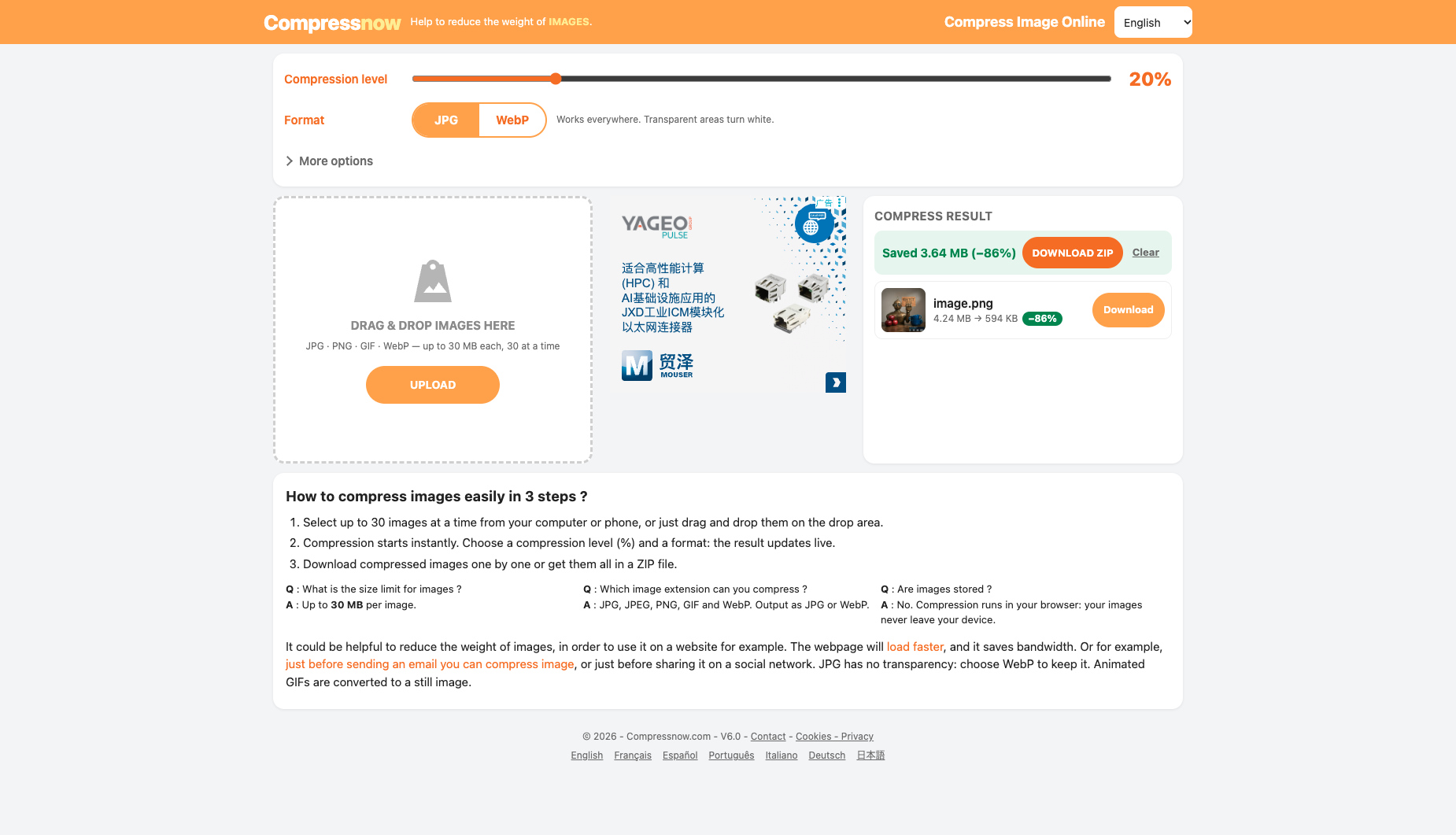
Browse this task →| Criterion | QuickImageKit Image Compressor Image compression 92/100 Seven-aspect task score 100% free and local in-browser compression with zero cloud upload, shrinking our 4.14 MB anchor by 93.33% to 276 KB (37.75 dB PSNR) in 0.54s, though PNG inputs are converted to WebP as disclosed. Tested export WEBP · Output attached Historical test · 2026-10-26 | CompressNow Image compression 83/100 Seven-aspect task score Free login-free on-device processing discloses format conversion upfront; size reduction is substantial, but PNG export is unavailable and transparency needs care. Tested export PNG · Output attached Historical test · 2026-10-18 |
|---|---|---|
| Pricing & rules | ||
| Pricing plans | Quick Image Kit in-browser local image utilities; completely free · 2026-10-26 Plan · source date Monthly / one-time Annual bill / period Quota & limits Free local web tool2026-10-26 ↗ Free Free Free Completely free without login; 100% local in-browser processing with quality slider and 50KB/100KB/200KB/500KB target-size presets, watermark-free export. PNG inputs are converted to WebP upon export (disclosed upfront as Format: PNG → WebP) 1 plan / billing-period records, all listed; — means that period is not recorded. The official page states that images are decoded and rendered locally in the browser without server uploads, with no paid subscriptions or credit packs; PNG inputs are exported as WebP. Cancellation, sources & verification recordCompletely free local utility with no accounts or paid subscriptions. Quick Image Kit official image compressor and privacy notice page ↗ · 2026-10-26 Capture 1 ↗ · Capture 2 ↗ | Compressnow online in-browser image compressor · 2026-10-21 Plan · source date Monthly / one-time Annual bill / period Quota & limits Compressnow Free Web2026-10-21 ↗ Free Free Free Free without login; up to 30 MB per image and up to 30 images at a time; individual or ZIP download. 1 plan / billing-period records, all listed; — means that period is not recorded. The official page and FAQ state that compression runs in the browser (images are not stored), supporting up to 30 MB per image and up to 30 images at a time for JPG/JPEG/PNG/GIF/WebP (output as JPG or WebP), with no paid tiers. Cancellation, sources & verification recordCompletely free web tool with no accounts or subscription charges. Compressnow official tool page and FAQ ↗ · 2026-10-21 Capture 1 ↗ |
| Free & trial allowance on the test date | Unlimited free usage with multi-image drag-and-drop and ZIP batch download | 100% free, up to 30 MB per image and up to 30 images per batch |
| Cancellation & refunds | Completely free local utility with no accounts or paid subscriptions. | Completely free web tool with no accounts or subscription charges. |
| Disclosure of costs & limits | Upfront disclosure on both landing page and workspace that PNG inputs convert to WebP | Discloses upfront at the top of the page that output format is JPG or WebP ('Transparent areas turn white') |
| Task quality | ||
| Measured fixture results | File reduction: 93.33% · Output size: 276 KB | File reduction: 85.99% · Output size: 579.8 KB |
| Fixture findings | Default Balanced mode converts the 4,137.9 KB anchor to a 276.0 KB WebP (-93.33%) with 37.75 dB PSNR and 0.9977 SSIM, keeping text and edges crisp. | Local compression reduced this fixture by about 86%; export changes to JPG or WebP, not PNG. |
| Original historical observation | Running 100% locally in the browser (0.0s upload, 0.54s end-to-end), QuickImageKit compressed our 4,137.9 KB (2048×2048) anchor PNG into a 276.0 KB WebP (-93.33%) at 37.75 dB PSNR and 0.9977 SSIM with sharp text and edges (02_workspace.png, 03_download.png). | CompressNow is a fast, 100% client-side compressor: your image never leaves your browser, and in 0.9s it shrinks our 4.24 MB benchmark PNG to 579.8 KB (-85.99%, 7.14×) at 42.34 dB PSNR (02_workspace.png). Note that it only outputs JPG or WebP (disclosed upfront), so users with transparent PNGs should select the WebP toggle. |
| Suitable uses · historical assessment | Privacy-conscious web developers and creators who want zero cloud upload and >90% size reduction into modern WebP format | Users who want to rapidly shrink bulky PNG screenshots or photos locally in-browser into high-quality JPG or WebP (-86% size) without uploading files to any server |
| Result & output evidence | ||
| Delivery capabilities | ||
| Recorded export specifications | WEBP · Output attached · No watermark in test | PNG · Output attached · No watermark in test |
| Historical specification note · not an official maximum | 2048 × 2048 (Full-size watermark-free WebP) | 2048×2048 full-resolution free export (outputs as JPG or WebP; does not export native PNG) |
| Watermark observation | Watermark-free | Watermark-free |
| Batch & API | Supports multi-image drag-and-drop and batch ZIP download; no external REST API | Supports up to 30 images (≤30 MB each) with one-click DOWNLOAD ZIP |
| Recorded free-tier dimensions | 2048 × 2048 | 2048 × 2048 |
| Attached file dimensions | Not verified | Not verified |
| Speed & reliability | ||
| Timing observation | Recorded local processing time: 0s · End-to-end reference: 0.54s | Recorded local processing time: 0.9s · End-to-end reference: 0.9s |
| Date & fixture | 2026-10-26 · anchor_compress_v1 · US-West (California, AS2914) | 2026-10-18 · anchor_compress_v1 · US-West (California, AS2914) |
| Repeated tests & reliability | No standardized repetition count, success rate or variability range is recorded. | No standardized repetition count, success rate or variability range is recorded. |
| Interaction experience | ||
| Account requirements | No login in this test | No login in this test |
| Sign-in methods | 100% login-free (no account system; pure local browser utility) | No registration or login required (100% local tool) |
| Manual adjustment | Not verified | Not verified |
| Interaction observations | Zero registration prompts, ad overlays, or deceptive redirects; dropping an image immediately displays original size, compressed size, reduction percentage, and a direct download button. | Clean single-page workspace with a live compression level slider (default 20%) and a single display ad banner, with zero popups or registration walls (02_workspace.png, 03_download.png). |
| Background & reputation | ||
| Service lifecycle notice | Not verified | Not verified |
| Operator | QuickImageKit (Independent Client-Side Toolkit) | CompressNow |
| Recorded origin | Undisclosed jurisdiction (Cloudflare global edge) | France / European Independent Developer |
| Domain history record | 2026–Present | 2012–Present (14-year online image compression tool) |
| Background & reputation assessment | Independent client-side browser image toolkit launched in 2026 with clear privacy documentation and contact channels, though without a disclosed corporate entity name. | Classic multi-language online image weight reducer operating for over 10 years (currently V6.0). |
| External reputation record | Not verified | Not verified |
| Engineering & privacy | ||
| Processing location | On-device processing | On-device processing |
| Third-party tracking record | Vercel Web Analytics (_vercel/insights) | Not verified |
| Engineering & privacy assessment | Verified via browser network monitoring: image compression runs 100% locally via Canvas / WebP encoding with zero bytes uploaded to any remote server (upload_s_net = 0s). | 100% local in-browser processing (`blob:https://compressnow.com/...`); FAQ explicitly states 'Compression runs in your browser: your images never leave your device.' |
| Retention statement | This flow runs locally; post-close deletion not independently verified | This flow runs locally; post-close deletion not independently verified |
| Evaluation basis | ||
| Pricing transparency | 35 / 35 100% free with no account registration, paywalls, or file-count caps; the landing page and workspace clearly disclose upfront that PNG inputs are converted to WebP for maximum compression (Format: PNG → WebP). Dropping our 4,137.9 KB (2048×2048) anchor PNG immediately enabled a free 276.0 KB download (01_landing.png, 02_workspace.png, 03_download.png). | 31 / 35 100% free for up to 30 MB per image and 30 images at a time; transparently discloses next to the Format toggle: 'Format: JPG | WebP — Works everywhere. Transparent areas turn white.' (01_landing.png). |
| Interaction restraint | 29 / 30 Zero registration prompts, ad overlays, or deceptive redirects; dropping an image immediately displays original size, compressed size, reduction percentage, and a direct download button. | 24 / 30 Clean single-page workspace with a live compression level slider (default 20%) and a single display ad banner, with zero popups or registration walls (02_workspace.png, 03_download.png). |
| Background & reputation | 14.5 / 20 Independent client-side browser image toolkit launched in 2026 with clear privacy documentation and contact channels, though without a disclosed corporate entity name. | 17 / 20 Classic multi-language online image weight reducer operating for over 10 years (currently V6.0). |
| Engineering & privacy | 14.5 / 15 Verified via browser network monitoring: image compression runs 100% locally via Canvas / WebP encoding with zero bytes uploaded to any remote server (upload_s_net = 0s). | 15 / 15 100% local in-browser processing (`blob:https://compressnow.com/...`); FAQ explicitly states 'Compression runs in your browser: your images never leave your device.' |
| Task quality | 59.5 / 65 In default Balanced mode, compresses the 4,137.9 KB (2048×2048) PNG anchor to a 276.0 KB WebP (-93.33%, 14.99× ratio) while achieving PSNR = 37.75 dB and SSIM = 0.9977 (59.5/65) | 52.2 / 65 Shrinks file size by 85.99% (7.14×) at 42.34 dB PSNR and 0.9992 SSIM, though output format is converted to JPG or WebP (52.2/65) |
| Deliverable specifications | 17 / 20 Preserves 100% of the 2048×2048 pixel resolution with zero watermarks or login walls and supports multi-file ZIP export; 3 points deducted because PNG inputs are converted to WebP (explicitly disclosed as Format: PNG → WebP) rather than preserving a native PNG container (17.0/20) | 15 / 20 Preserves full 2048×2048 dimensions and supports 30 MB files, but converts PNG inputs to JPG (or WebP) rather than native `.png` (15.0/20) |
| Processing speed | 15 / 15 100% client-side local browser encoding with 0.0s network upload or server wait, completing the 2048×2048 anchor in ~0.54s end-to-end (15.0/15) | 14 / 15 100% local browser Canvas compression with 0 bytes uploaded in ~0.9s (14.0/15) |