See your options side by side
Choose one task and 2–4 tools. Compare pricing, output, test results and trust.
Test scope & comparison notes
These are recorded facts, not a unified ranking. Tested tiers and scope are not consistently recorded. Read pricing with its date and timing with its conditions. Privacy observations reflect visible flows and statements, not a security audit.
Cross-task capability coverage across selected products
Each product is scored independently per task edge; switch tasks below while keeping shared products selected| Task edge | Krea | Clipping Magic | Switch / compare |
|---|---|---|---|
| Background removal | 84/100 2048 × 2048 · PNG | 76/100 500 × 500 · PNG | Active task |
| Image upscaling | 71/100 1024×1024 (PNG · 2.0x Generative Enhance) · Historical description; output not attached | Not tested in topic | Compare in task topic → |
| Object removal | 91/100 2048×2048 (Native full-resolution watermark-free PNG) · Historical description; output not attached | Not tested in topic | Compare in task topic → |
| Image generation | 93/100 2048 × 2048 · PNG | Not tested in topic | Compare in task topic → |
Select at least 2 tools to compare
You can also filter a task page first, then compare your shortlist.
Browse this task →| Criterion | Krea AI Edit (Background Removal) Background removal 84/100 Seven-aspect task score Canvas-based editing, full-size export within the free allowance and a disclosed engine suit continued editing; registration and login are required. Tested export 2048 × 2048 · PNG Historical test · 2026-10-16 | Clipping Magic (Canva) Background removal 76/100 Seven-aspect task score Hair refinement and live preview work without registration; free export is only 500px for non-commercial use, with credits needed for full size. Tested export 500 × 500 · PNG Historical test · 2026-10-17 |
|---|---|---|
| Pricing & rules | ||
| Pricing plans | Individual web plans and default Business 80k volume; excludes API and other business volumes · 2026-10-20 Plan · source date Monthly / one-time Annual bill / period Quota & limits Basic2026-10-20 ↗ USD 9/month USD 63/year Monthly 5,000 general compute units/month; not removal counts Annual 5,000 general compute units/month Observed first-year promotion USD 63; then USD 84/year until cancelled Rules [1]Pro2026-10-20 ↗ USD 35/month USD 252/year Monthly 20,000 general compute units/month; not removal counts Annual 20,000 general compute units/month Observed first-year promotion USD 252; then USD 336/year until cancelled Rules [1]Max 60k2026-10-20 ↗ USD 105/month USD 756/year Monthly 60,000 general compute units/month; not removal counts Annual 60,000 general compute units/month Observed first-year promotion USD 756; then USD 1008/year until cancelled Rules [1]Business 80k2026-10-20 ↗ USD 200/month USD 1,920/year Monthly 80,000 general compute units/month; not removal counts Annual 80,000 general compute units/month Max 40k2026-10-20 ↗ USD 70/month USD 504/year Annual 40,000 general compute units/month Observed first-year promotion USD 504; then USD 672/year until cancelled Rules [1]Monthly 40,000 general compute units/month Max 80k2026-10-20 ↗ USD 135/month USD 972/year Annual 80,000 general compute units/month Observed first-year promotion USD 972; then USD 1296/year until cancelled Rules [1]Monthly 80,000 general compute units/month Max 100k2026-10-20 ↗ USD 165/month USD 1,188/year Annual 100,000 general compute units/month Observed first-year promotion USD 1188; then USD 1584/year until cancelled Rules [1]Monthly 100,000 general compute units/month Enterprise2026-10-20 ↗ Contact sales Quoted Quoted Custom enterprise support, security and administration 16 plan / billing-period records, all listed; — means that period is not recorded. All 10 previously missing amounts are confirmed in USD checkout summaries. Individual annual offers separate first-year and renewal charges; Business 80k is $1,920/year. Max monthly purchase paths show additional annual offers whose checkout totals were not independently confirmed; these are not merged with the default annual offer. Per-removal compute cost and extra top-up pricing are not separately specified in the verified plans/checkouts. Other Business volumes are outside scope. Verification has gaps; unknown prices and quotas are not inferred. Cancellation, sources & verification recordSelf-serve cancellation in account settings Official plans and usage terms ↗ · 2026-10-20 Capture 1 ↗ USD checkout summaries reached from official pricing ↗ · 2026-10-20 Capture 1 ↗ · Capture 2 ↗ · Capture 3 ↗ · Capture 4 ↗ · Capture 5 ↗ · Capture 6 ↗ · Capture 7 ↗ · Capture 8 ↗ · Capture 9 ↗ · Capture 10 ↗ Additional annual offers on monthly purchase paths ↗ · 2026-10-20 Capture 1 ↗ · Capture 2 ↗ · Capture 3 ↗ | All public monthly and annual web editor tiers in USD; API priced separately · 2026-10-20 Plan · source date Monthly / one-time Annual bill / period Quota & limits Free editing preview2026-10-20 ↗ Free Free Free Unlimited uploads and editing previews; watermark-free downloads require subscription Light2026-10-20 ↗ USD 3.99/month USD 39.84/year Monthly 15 credits/month; 1 credit per uploaded image downloaded Rollover capped at 75; remaining credits expire when subscription ends Rules [1]Annual 180 credits/year; 1 credit per uploaded image downloaded Rollover capped at 900; remaining credits expire when subscription ends Rules [1]Standard2026-10-20 ↗ USD 7.99/month USD 79.8/year Monthly 100 credits/month; 1 credit per uploaded image downloaded Rollover capped at 500; remaining credits expire when subscription ends Rules [1]Annual 1200 credits/year; 1 credit per uploaded image downloaded Rollover capped at 6000; remaining credits expire when subscription ends Rules [1]Pro2026-10-20 ↗ USD 19.99/month USD 199.8/year Monthly 500 credits/month; 1 credit per uploaded image downloaded Rollover capped at 2500; remaining credits expire when subscription ends Rules [1]Annual 6000 credits/year; 1 credit per uploaded image downloaded Rollover capped at 30000; remaining credits expire when subscription ends Rules [1]Pro-1k2026-10-20 ↗ USD 29.99/month — Monthly 1000 credits/month; 1 credit per uploaded image downloaded Rollover capped at 5000; remaining credits expire when subscription ends Rules [1]Pro-2k2026-10-20 ↗ USD 44.99/month — Monthly 2000 credits/month; 1 credit per uploaded image downloaded Rollover capped at 10000; remaining credits expire when subscription ends Rules [1]Pro-4k2026-10-20 ↗ USD 74.99/month — Monthly 4000 credits/month; 1 credit per uploaded image downloaded Rollover capped at 20000; remaining credits expire when subscription ends Rules [1]Pro-12k2026-10-20 ↗ — USD 299.88/year Annual 12000 credits/year; 1 credit per uploaded image downloaded Rollover capped at 60000; remaining credits expire when subscription ends Rules [1]Pro-24k2026-10-20 ↗ — USD 449.88/year Annual 24000 credits/year; 1 credit per uploaded image downloaded Rollover capped at 120000; remaining credits expire when subscription ends Rules [1]Pro-48k2026-10-20 ↗ — USD 749.88/year Annual 48000 credits/year; 1 credit per uploaded image downloaded Rollover capped at 240000; remaining credits expire when subscription ends Rules [1]13 plan / billing-period records, all listed; — means that period is not recorded. Repeat edits/downloads of one upload are free; duplicate uploads count separately. No pay-as-you-go option. Cancellation, sources & verification recordCancel anytime with access until the period end; subscription fees are non-refundable. Official plans and usage terms ↗ · 2026-10-20 Capture 1 ↗ · Capture 2 ↗ · Capture 3 ↗ · Capture 4 ↗ |
| Free & trial allowance on the test date | Free workspace includes daily replenishing compute credits and direct 2048×2048 transparent PNG downloads | Unlimited free interactive editing; free download capped at 500×500 Small Preview; full-size 2048×2048 costs 1 credit |
| Cancellation & refunds | Self-serve cancellation in account settings | Cancel anytime with access until the period end; subscription fees are non-refundable. |
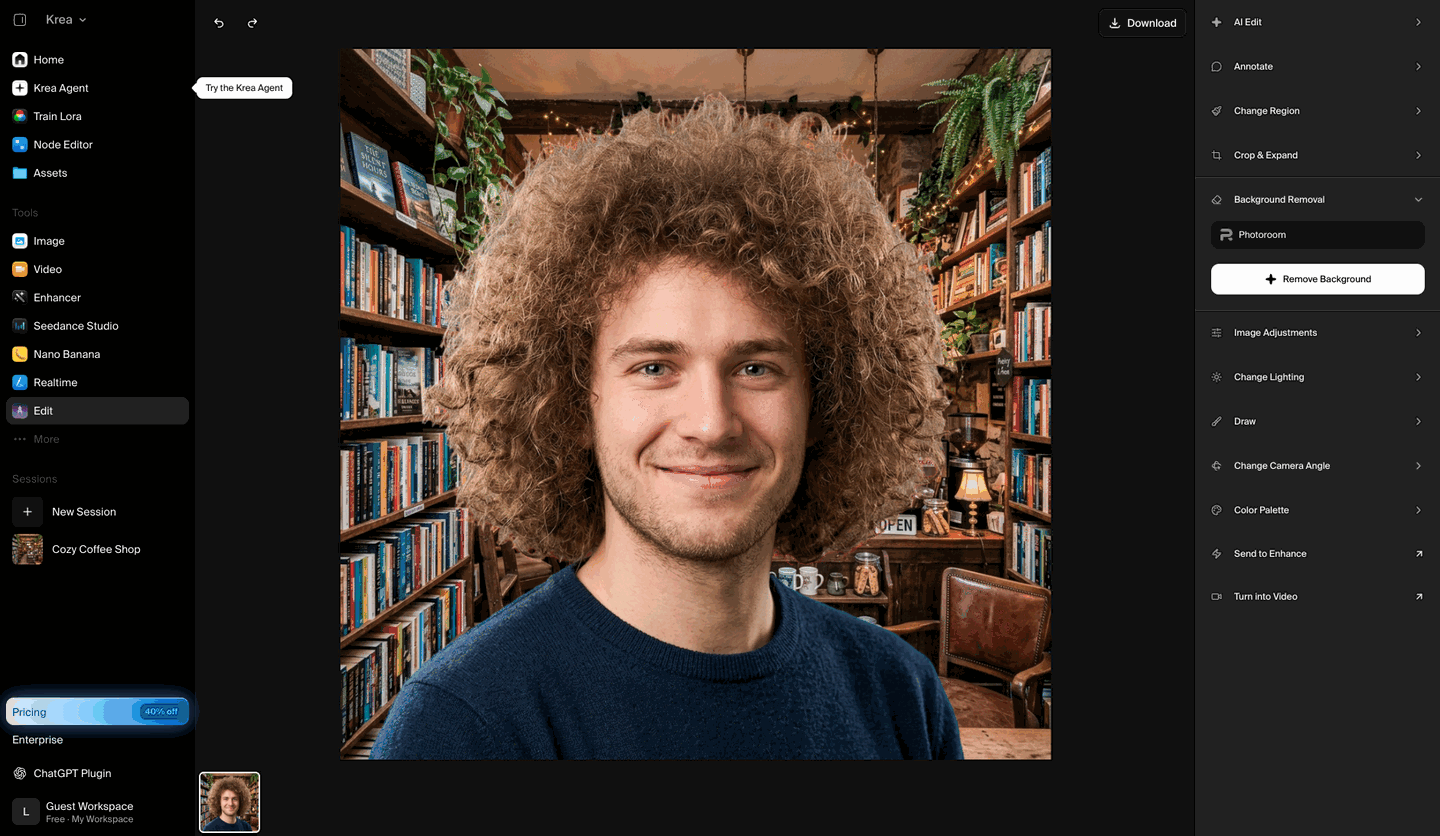
| Disclosure of costs & limits | Right panel displays the Photoroom engine badge and provides direct full-resolution download | Pricing link visible in top toolbar; Download button leads to plan comparison page with green free-preview banner |
| Task quality | ||
| Measured fixture results | Edge error MAD: 0.217 (Lower is better) · Global error SAD(k): 37.841 (Lower is better) · Foreground retention: 99.730% (Higher is better) · Background residue: 0.100% (Lower is better) | Edge error MAD: 0.2145 (Lower is better) · Global error SAD(k): 86.88 (Lower is better) · Foreground retention: 98.500% (Higher is better) · Background residue: 0.850% (Lower is better) |
| Fixture findings | Strong subject retention, little background residue and full-size output in this test; scope is limited to the recorded fixture. | Hair refinement and live preview are available; this free export was only 500px with faint edge residue. |
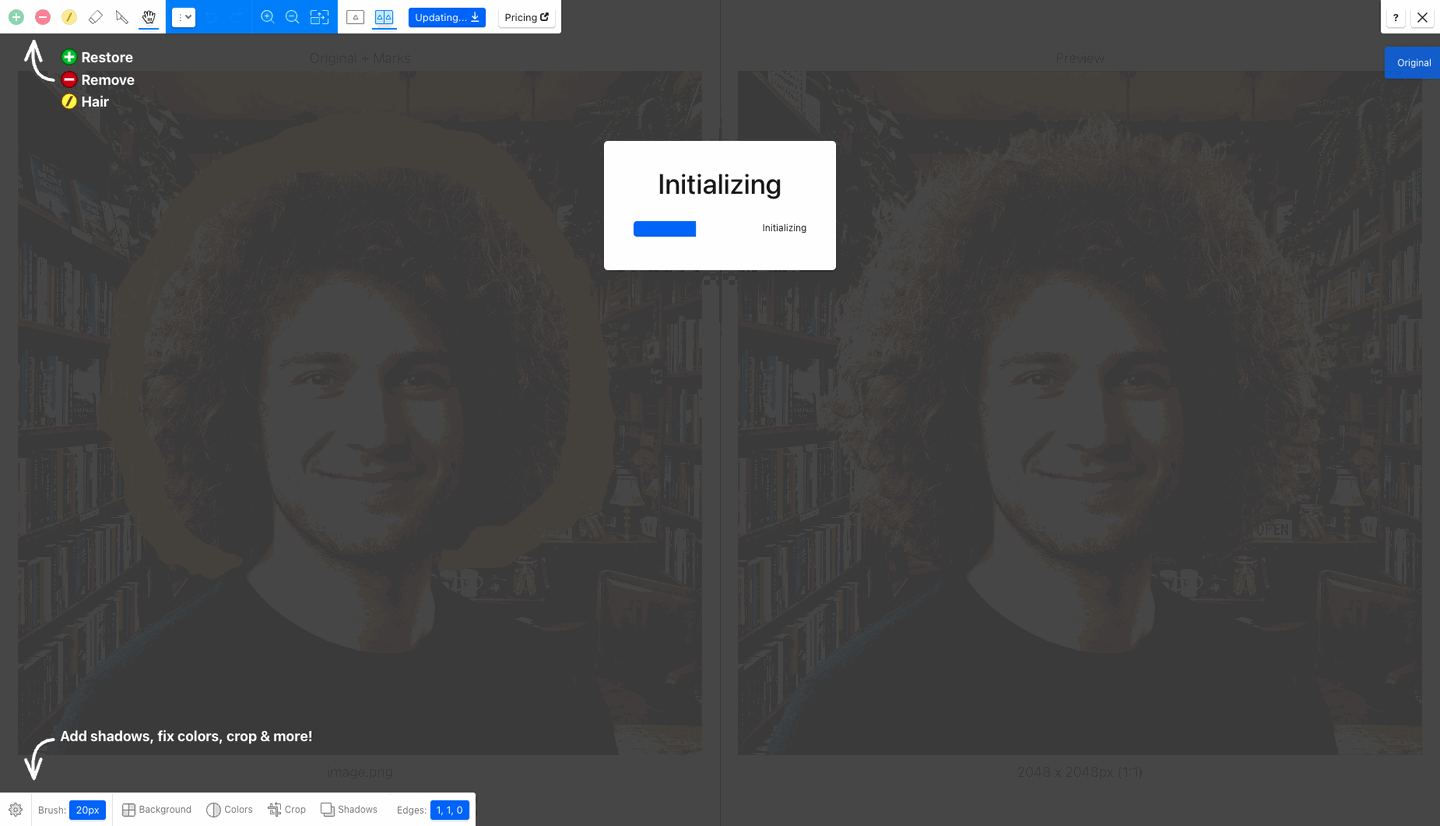
| Original historical observation | Powered by the Photoroom engine inside Krea Edit, achieving low global error (SAD(k)=37.841), 99.73% foreground recall, and 0.10% background leak at full 2048×2048 resolution. | Clipping Magic pioneered the dual-pane Red/Green + Yellow Hair Ring workspace, automatically tracing a yellow transition ring around the models curly hair. The free 500×500 Small Preview PNG achieves 97.74% IoU with a slight warm halo on outer flyaway strands. |
| Suitable uses · historical assessment | Designers already using Krea for inpainting or upscaling who want 1-click 2048×2048 transparent cutouts in the same canvas | E-commerce retouchers who want dedicated Red (remove) / Green (keep) / Yellow (hair) brushes for manual edge perfection |
| Result & output evidence | ||
| Delivery capabilities | ||
| Recorded export specifications | 2048 × 2048 · PNG · No watermark in test | 500 × 500 · PNG · Check watermark record |
| Historical specification note · not an official maximum | 2048×2048 (100% native RGBA PNG export) | 500 × 500 (True Alpha PNG, 5.96% pixel area retained) |
| Watermark observation | No Watermark | No diagonal watermark on the 500×500 Small Preview file (non-commercial use) |
| Batch & API | Multi-stage timeline inside canvas | Bulk Clipping and REST API available on Standard and Pro tiers |
| Recorded free-tier dimensions | 2048 × 2048 | 500 × 500 |
| Attached file dimensions | 2048 × 2048 · PNG | 500 × 500 · PNG |
| Speed & reliability | ||
| Timing observation | Network-observed server wait: 11.5s · End-to-end reference: 12.9s | Network-observed server wait: 8.4s · End-to-end reference: 10.5s |
| Date & fixture | 2026-10-16 · anchor_bgremove_v1 · US-West (California, AS2914) | 2026-10-17 · anchor_bgremove_v1 · US-West (California, AS2914) |
| Repeated tests & reliability | No standardized repetition count, success rate or variability range is recorded. | No standardized repetition count, success rate or variability range is recorded. |
| Interaction experience | ||
| Account requirements | Account required in this test | No login in this test |
| Sign-in methods | Free login via Google or Email | No login required for editor & 500×500 preview download; Cedar Lake Ventures SSO for full-res subscribers |
| Manual adjustment | Manual erase / adjustment recorded in the historical flow | Industry-standard Red/Green/Yellow Hair Tool brushes plus precision scalpel and feathering |
| Interaction observations | Clean dark canvas workspace; clicking Remove Background adds a transparent stage to the bottom timeline with one-click Download in the top-right. | No signup or credit card is required to test the full interactive editor (including the dedicated yellow Hair Tool, scalpel, edge feathering, and cast shadow controls) and export a 500×500 transparent PNG via Download Small Preview. |
| Background & reputation | ||
| Service lifecycle notice | Not verified | Not verified |
| Operator | Krea AI Inc. | Cedar Lake Ventures, Inc. (Canva Group) |
| Recorded origin | San Francisco, CA, USA | California, USA / Sydney, Australia (Canva Subsidiary) |
| Domain history record | 2022–Present | 2013–present (13+ years) |
| Background & reputation assessment | Developed by Krea AI Inc. (San Francisco, CA), openly integrating PhotoRoom SAS's segmentation model. | Founded by Stanford AI researcher Ericoden (Cedar Lake Ventures, Inc.) in 2013 and acquired by Canva in 2021; one of the industrys most established interactive matting tools. |
| External reputation record | Highly regarded all-in-one generative AI studio. | Not verified |
| Engineering & privacy | ||
| Processing location | Uploaded for cloud processing | Uploaded for cloud processing |
| Third-party tracking record | No third-party services listed in this record; this is not proof that none exist. | Not verified |
| Engineering & privacy assessment | Zero client-side pre-downscaling; uploads the 2048×2048 image and returns a full 2048×2048 RGBA PNG. | Supports 2048×2048 uploads with hybrid Cloud Auto-Clip AI + client WebGL canvas refinement; unsaved guest uploads are automatically purged. |
| Retention statement | Explicit retention period unconfirmed; inspect policy record | Explicit retention period unconfirmed; inspect policy record |
| Evaluation basis | ||
| Pricing transparency | 34 / 40 Requires a free login to enter Krea Edit (01_landing.png); the right-hand Background Removal panel explicitly discloses that segmentation is powered by Photoroom (02_workspace.png), and the free daily compute allowance lets you export the full 2048×2048 watermark-free RGBA PNG directly (03_download.png). | 26.5 / 35 Anonymous guests can upload a full 2048×2048 image into the dual-pane Smart Editor (left red/green/yellow hair brush canvas, right live preview). Clicking Download opens the Subscription Plans page with a prominent green banner: "You can download a size-limited preview result free for non-commercial use — Download Small Preview" (02_workspace.png, 03_download.png). |
| Interaction restraint | 19 / 20 Clean dark canvas workspace; clicking Remove Background adds a transparent stage to the bottom timeline with one-click Download in the top-right. | 24.5 / 30 No signup or credit card is required to test the full interactive editor (including the dedicated yellow Hair Tool, scalpel, edge feathering, and cast shadow controls) and export a 500×500 transparent PNG via Download Small Preview. |
| Background & reputation | 22 / 25 Developed by Krea AI Inc. (San Francisco, CA), openly integrating PhotoRoom SAS's segmentation model. | 18.5 / 20 Founded by Stanford AI researcher Ericoden (Cedar Lake Ventures, Inc.) in 2013 and acquired by Canva in 2021; one of the industrys most established interactive matting tools. |
| Engineering & privacy | 13 / 15 Zero client-side pre-downscaling; uploads the 2048×2048 image and returns a full 2048×2048 RGBA PNG. | 12 / 15 Supports 2048×2048 uploads with hybrid Cloud Auto-Clip AI + client WebGL canvas refinement; unsaved guest uploads are automatically purged. |
| Task quality | 50.5 / 65 Transition band error mad_band=0.217 · Global SAD(k)=37.841 · Foreground recall 99.73% / Background leak 0.100% | 47 / 65 Auto-Clip mode with automatic yellow Hair Ring detection achieved 97.74% foreground IoU, with SAD = 86.88k and edge mad_band = 0.2145 due to 500×500 free preview downscaling and mild warm halo in outer flyaway curls (47.0/65). |
| Deliverable specifications | 20 / 20 True Alpha channel (8/8); Max deliverable spec: 2048×2048 (100% native RGBA PNG export) | 15 / 20 Free Small Preview exports a 500×500 8-bit RGBA transparent PNG without diagonal watermarks (5.96% pixel area retained, non-commercial use); full 2048×2048 resolution requires 1 subscription credit (15.0/20). |
| Processing speed | 12 / 15 Network-observed server wait: 11.5s (API mode: async_queue; network upload 1.4s / end-to-end 12.9s shown for reference only, never penalized) | 11 / 15 Cloud Auto-Clip initialization and automatic hair ring segmentation completed in ~8.4s (11.0/15). |