| Pricing & rules |
|---|
| Pricing plans |
EveryTool4U platform tool authorization and service pricing · 2026-11-01
Plan · source date Monthly / one-time Annual bill / period Quota & limits Free Free Free Unlimited usage across 109 online tools with no daily quota or queue limits Includes PDF merge, split, compression, Word conversion, OCR, image compression, background removal, and office utilities;Client-side processing; performance on large files depends on local device RAM and browser limits;No account registration or renewal required;Permanent access 1 plan / billing-period records, all listed; — means that period is not recorded.
All tools are completely free indefinitely without registration or subscriptions; most tasks execute entirely on-device.
Cancellation, sources & verification recordCancellation and refund terms unverified EveryTool4U Official Homepage ↗ · 2026-11-01 Capture 1 ↗ EveryTool4U About and Privacy Architecture Page ↗ · 2026-11-01 Capture 1 ↗ |
OCR2Edit online OCR text recognition and document conversion plans · 2026-11-14
Plan · source date Monthly / one-time Annual bill / period Quota & limits Free Free Free Free access to most apps without login, standard queue, limited file size Access to scanned document OCR, conversion to Word/Excel/PPT, and searchable PDF generation;No batch processing, standard queue, display ads present;Permanently free, no renewal;Never expires USD 8/month — Monthly 64GB file size support, batch processing, priority queue, ad-free, priority support Full access to all apps, batch processing, and AI integrations Rules [1] [2] [3] — USD 77/year Annual 64GB file size support, batch processing, priority queue, ad-free, priority support (save 19%) Full access to all apps, batch processing, and AI integrations Rules [1] [4] [5] USD 29/month — Monthly Faster priority queue, advanced settings, 5x AI usage, automation support All Starter features plus faster priority queue and 5x AI usage Rules [2] [3] [6] — USD 278/year Annual Faster priority queue, advanced settings, 5x AI usage, automation support (save 20%) All Starter features plus faster priority queue and 5x AI usage Rules [4] [5] [6] USD 89/month — Monthly Skip queue, business apps access, centralized billing, 20x AI usage All Pro features plus custom limits and centralized team management;Per seat monthly billing Rules [2] [3] — USD 854/year Annual Skip queue, business apps access, centralized billing, 20x AI usage (save 20%) All Pro features plus custom limits and centralized team management;Per seat annual billing Rules [4] [5] 7 plan / billing-period records, all listed; — means that period is not recorded.
[1] For single user [2] Auto-renews monthly, cancel anytime [3] Active during monthly subscription [4] Auto-renews annually, cancel anytime [5] Active during annual subscription [6] For individuals and small teams Core features free without registration; Premium tiers unlock up to 64GB file sizes, batch processing, priority queue, and AI credits with a 14-day money-back guarantee.
Cancellation, sources & verification recordCancellation and refund terms unverified OCR2Edit Official Homepage & Workspace ↗ · 2026-11-14 Capture 1 ↗ OCR2Edit Official Monthly Pricing ↗ · 2026-11-14 Capture 1 ↗ OCR2Edit Official Yearly Pricing ↗ · 2026-11-14 Capture 1 ↗ |
|---|
| Free & trial allowance on the test date | Entire platform free without task limits or quotas | Free without login up to 50 MB per file on standard queue |
|---|
| Cancellation & refunds | | |
|---|
| Disclosure of costs & limits | Immediate processing with live text preview and direct download button | Discloses 50 MB free limit on landing and presents Convert vs Convert with OCR options immediately upon upload |
|---|
| Task quality |
|---|
| Measured fixture results | Text retained: 100% · Editable table cells: 0 · Page 2 preserved: Yes | Text retained: 100% · Editable table cells: 0 · Page 2 preserved: Yes |
|---|
| Fixture findings | Under anchor_pdf2word_v1, it produced an 8.1 KB editable Word document with 100% text retention; tables are rendered as formatted text lines without native grid. | Retains 100% of text (4/4 headings, 12/12 cell values, Page 2 check code, 0 raster images) but flattens the table into paragraphs without a native Word `<w:tbl>` grid. |
|---|
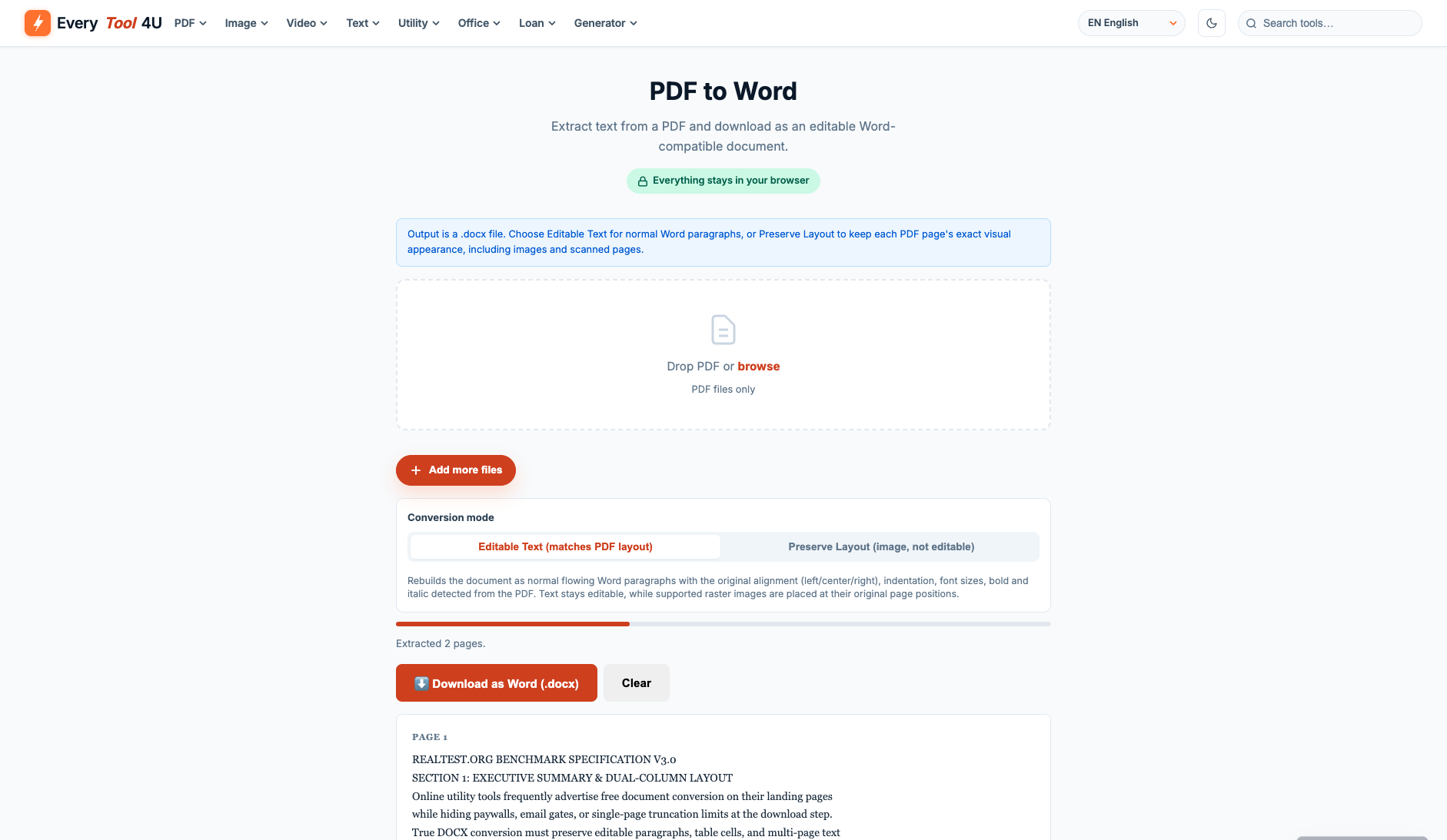
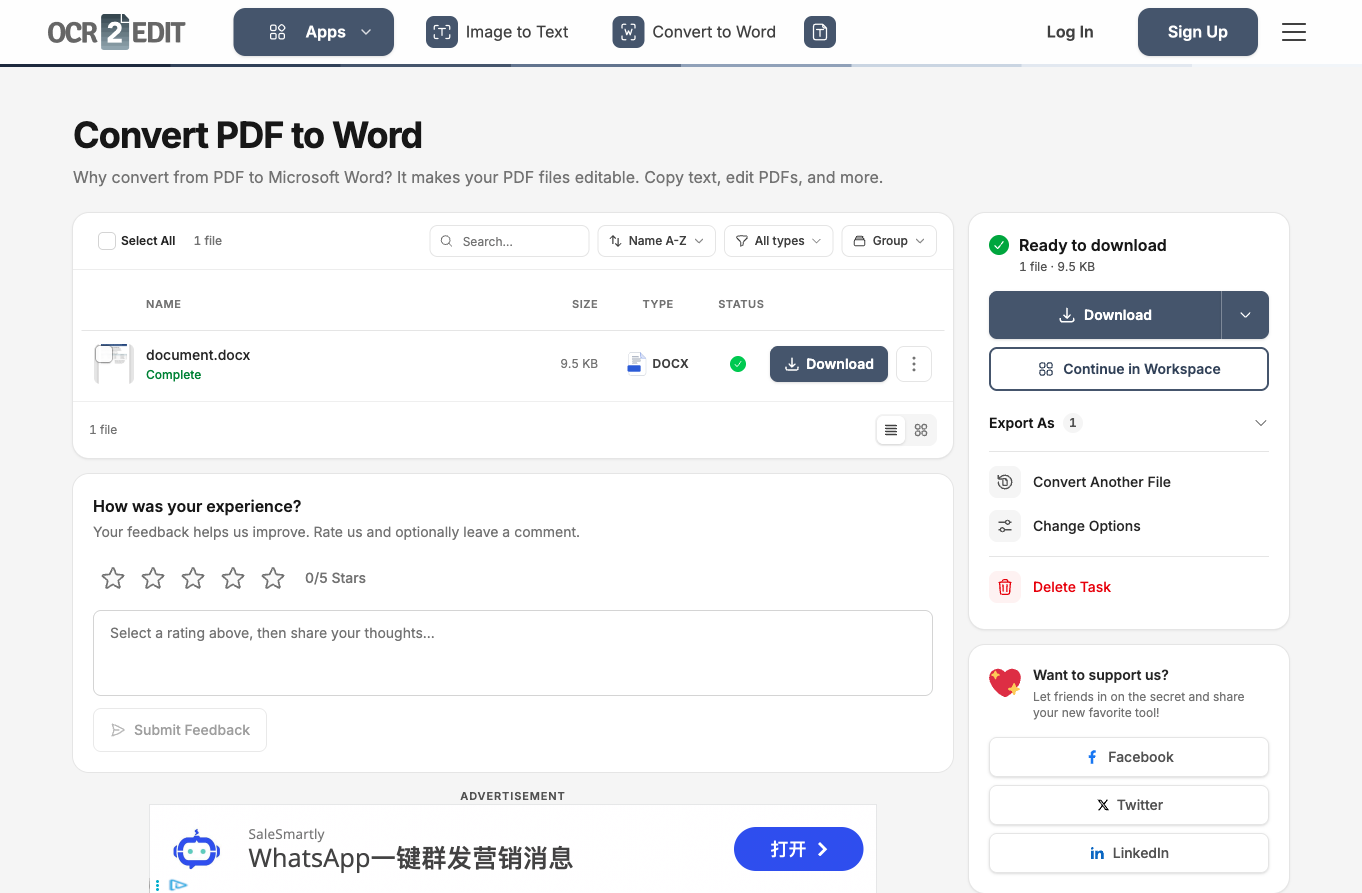
| Original historical observation | EveryTool4U converted the test PDF into an 8.1 KB editable Word document in 0.33s using client-side JavaScript, retaining 100% text with zero watermarks. | Using Standard Convert mode, OCR2Edit outputs a 9.5 KB editable .docx in 6.49s (0 embedded images, 61 paragraphs) preserving all 1,269 characters and Page 2 intact, though the 4×4 financial table is flattened into paragraph text (p2w_02_result.png, p2w_03_download.png). |
|---|
| Suitable uses · historical assessment | Privacy-conscious users needing quick extraction of PDF text into editable Word without cloud uploads | Users needing quick, login-free extraction of digital PDF text into a lightweight editable .docx when complex table grid reconstruction is not critical. |
|---|
| Result & output evidence | | |
|---|
| Scans / OCR | The fixture is a text PDF; scans and OCR were not tested | The fixture is a text PDF; scans and OCR were not tested |
|---|
| Delivery capabilities |
|---|
| Recorded export specifications | DOCX · Output attached · No watermark in test | DOCX · Output attached · No watermark in test |
|---|
| Historical specification note · not an official maximum | Full 2-Page Watermark-Free Editable DOCX (8.1 KB · 100% Text Retention) | 2-page native .docx (9.5 KB · 61 paragraphs · zero watermark · flattened tables) |
|---|
| Watermark observation | | |
|---|
| Batch & API | Supports Editable Text and Preserve Layout modes | Single-file standard queue up to 50 MB on free tier; 64 GB files, batch processing, and priority queue on paid tiers |
|---|
| Recorded free-tier dimensions | | |
|---|
| Attached file dimensions | | |
|---|
| Published allowances & file limits · not tested | Free Tier: Unlimited usage across 109 online tools with no daily quota or queue limits · Includes PDF merge, split, compression, Word conversion, OCR, image compression, background removal, and office utilities · Client-side processing; performance on large files depends on local device RAM and browser limits | Free: Free access to most apps without login, standard queue, limited file size · Access to scanned document OCR, conversion to Word/Excel/PPT, and searchable PDF generation · No batch processing, standard queue, display ads present |
|---|
| Speed & reliability |
|---|
| Timing observation | Recorded local processing time: 0s · End-to-end reference: 0.33s | Network-observed server wait: 6.49s · End-to-end reference: 6.86s |
|---|
| Date & fixture | 2026-11-05 · anchor_pdf2word_v1 · Client-Side (WASM / Browser Local) | 2026-11-18 · anchor_pdf2word_v1 · US-West (California, AS2914) |
|---|
| Repeated tests & reliability | No standardized repetition count, success rate or variability range is recorded. | No standardized repetition count, success rate or variability range is recorded. |
|---|
| Interaction experience |
|---|
| Account requirements | | |
|---|
| Sign-in methods | 100% login-free local execution and export | No login required for direct conversion and download |
|---|
| Manual adjustment | | |
|---|
| Interaction observations | Clean utility UI with Editable Text vs Layout modes, live text extraction preview, and instant DOCX download (02_result.png, 03_download.png). | Allows anonymous uploads up to 50 MB without login, clearly exposes the 'Convert' vs 'Convert with OCR' toggle, and provides direct watermark-free Download and Delete Task buttons alongside display ads. |
|---|
| Background & reputation |
|---|
| Service lifecycle notice | | |
|---|
| Operator | | |
|---|
| Recorded origin | United States / Independent Developer | |
|---|
| Domain history record | | |
|---|
| Background & reputation assessment | Independent developer platform launched in 2026 disclosing open-source libraries transparently. | |
|---|
| External reputation record | | |
|---|
| Engineering & privacy |
|---|
| Processing location | | Uploaded for cloud processing |
|---|
| Third-party tracking record | Google AdSense · Google Tag Manager | Google AdSense · Google Analytics |
|---|
| Engineering & privacy assessment | 100% client-side PDF.js and JSZip execution; zero document upload to external servers. | Processes uploads over HTTPS on QaamGo's isolated `dragon.ocr2edit.com` cluster with an instant Delete Task button, 24-hour auto-purge, and no AI model training. |
|---|
| Retention statement | This flow runs locally; post-close deletion not independently verified | Claims deletion within 24 hours; deletion not independently verified |
|---|
| Evaluation basis |
|---|
| Pricing transparency | 35 / 35 100% free with no login, subscription, or paywall traps (01_landing.png). Scores & evidence → | |
|---|
| Interaction restraint | 28 / 30 Clean utility UI with Editable Text vs Layout modes, live text extraction preview, and instant DOCX download (02_result.png, 03_download.png). Scores & evidence → | 26 / 30 Allows anonymous uploads up to 50 MB without login, clearly exposes the 'Convert' vs 'Convert with OCR' toggle, and provides direct watermark-free Download and Delete Task buttons alongside display ads. Scores & evidence → |
|---|
| Background & reputation | 13 / 20 Independent developer platform launched in 2026 disclosing open-source libraries transparently. Scores & evidence → | |
|---|
| Engineering & privacy | 15 / 15 100% client-side PDF.js and JSZip execution; zero document upload to external servers. Scores & evidence → | 14 / 15 Processes uploads over HTTPS on QaamGo's isolated `dragon.ocr2edit.com` cluster with an instant Delete Task button, 24-hour auto-purge, and no AI model training. Scores & evidence → |
|---|
| Task quality | 45 / 65 Deterministic OOXML DOCX inspection: exported 8.1 KB DOCX retaining 100% text (4/4 headings, 12/12 table values, 3/3 body paragraphs, Page 2 token); tables flattened into aligned paragraphs without native <w:tbl> grid (45.0/65) Scores & evidence → | 45 / 65 OOXML inspection (using Standard Convert mode): exported a 9.5 KB editable DOCX (61 paragraphs, 0 embedded raster images) retaining 100.0% of text (4/4 headings, 12/12 table cell strings, 3/3 body phrases, and Page 2 check code), though the 4×4 financial table was flattened into paragraphs rather than a native Word `<w:tbl>` grid (45.0/65) Scores & evidence → |
|---|
| Deliverable specifications | 17 / 20 Free export of standard editable DOCX without watermarks or page limits (17.0/20) Scores & evidence → | 17 / 20 Exports a genuine watermark-free OpenXML (.docx) container (9,763 bytes) without login or page truncation, with 100% editable text but no native Word table object (17.0/20) Scores & evidence → |
|---|
| Processing speed | 15 / 15 Client-side in-memory text parsing and DOCX packaging finished in 0.33s (15.0/15) Scores & evidence → | 13.5 / 15 Async cloud conversion job (dragon.ocr2edit.com/api/jobs/.../conversions) completed in 6.49s server wait including polling (13.5/15) Scores & evidence → |
|---|